API Authorization
Tingyun provides data export APIs for all functional modules, and all APIs use the same authentication method.
Tingyun API Authentication
Terminology
api_key: A public key assigned by the platform to each administrator (main account), which is a string of characters used to verify identity when making API requests. You can obtain it from "User Center > Account Management > API".
secret_key: A private key used to generate digital signatures, which corresponds one-to-one with api_key. You can obtain it from "User Center > Account Management > API".
timestamp: The current request timestamp (millisecond timestamp).
auth: A digital signature generated through specific rules.
Authentication Description
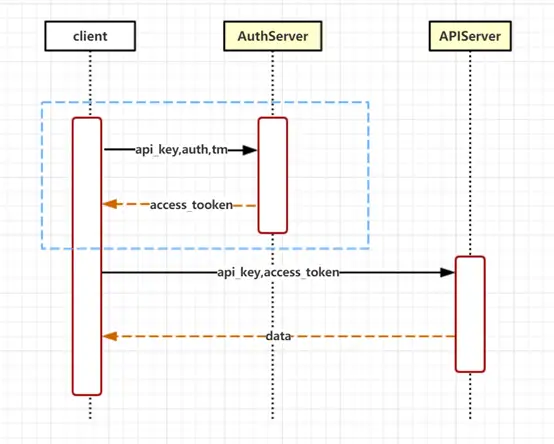
-
Users send a request to the authentication service, which includes api_key, auth, and timestamp parameters.
-
After receiving the request, the authentication service validates the parameters and returns an access_token upon successful validation.
-
After receiving the access_token, you can use it to request APIs and obtain data.
access_token Description:
- The access_token is valid for 2 hours and expires after expiration.
Applying for access_token again will invalidate the previously applied access_token, with the most recently applied one taking precedence.
- After the access_token expires, you need to reapply. It is recommended to establish an access_token update mechanism so that it can be updated in time after expiration.
auth Calculation Rules:
- auth string concatenation
api_key="here_is_the_api_key_value"&secret_key="here_is_the_secret_key_value"×tamp="here_is_the_current_request_millisecond_timestamp"
- auth string encryption: Encrypt the concatenated auth string with 32-bit lowercase MD5 encryption.
Obtaining access_token
API endpoint: ${host}/my-api/auth/token?api_key=xxxxx&auth=xxxxx×tamp=xxxxxx
Parameter Description
| Parameter | Type | Description |
|---|---|---|
| api_key | String | Identity verification code |
| auth | String | Encrypted signature |
| timestamp | Long | Current request millisecond timestamp |
Response Description
Example:
{

"code":200,

"msg":"success",

"access_token":" hbWUiOiLkupHljZfnlLXnvZEiLCJjb"

}
Description:
| Parameter | Description |
|---|---|
| code | Return code |
| msg | Return message |
| access_token | access_token, used for identity authentication when calling Tingyun APIs |
Return Code Description:
| Code | MSG | Description |
|---|---|---|
| 200 | success | Success |
| 40001 | Invalid timestamp | Invalid timestamp |
| 40002 | Invalid api_key | Invalid api_key |
| 40003 | Invalid auth | Invalid signature |
Calling Tingyun APIs to Obtain Data
To call Tingyun APIs to obtain data, you need to add the Authorization parameter in the request Headers, with the value "Bearer"+\${access_token}.
Authorization example:
Authorization= Bearer hbWUiOiLkupHljZfnlLXnvZEiLCJjb
Note: There is a space between Bearer and access_token.