Integrating OpenTelemetry Trace and Metric Data
Supported Versions and Requirements
Currently, only the OpenTelemetry Java Agent is supported. Supported Agent versions: 2.0–2.21.
Minimum Collector version: 4.2.0.0, with the Guanyun Collector module enabled.
Preparing Collector Host Resources
The minimum configuration for the host deploying Collector is as follows:
-
Operating System: CentOS 7 and above, Redhat 7 and above, Ubuntu 18 and above
-
CPU: 4 Cores and above
-
Physical Memory: 8GB and above
Currently, in the same deployment environment, only one Collector for integrating OpenTelemetry Trace is supported, and horizontal scaling through multiple Collector instances is not supported.
Integrating OpenTelemetry Trace data will consume more host resources. According to test verification, a Collector deployed on a host with 4 Cores / 8GB can handle approximately 1500 TPS of Trace data traffic.
If the incoming traffic exceeds 1500 TPS, you need to expand the resources of this Collector. We recommend calculating the CPU and memory resources of Collector according to the following formula:
CPU Cores = 4 * Peak TPS in a day / 1500

Memory(GB) = 8 * Peak TPS in a day / 1500
Configuring Network and Port Rules
OpenTelemetry Agent collects data on the host where the application is located and reports the data to Collector. Therefore, you need to ensure network connectivity between the OpenTelemetry Agent host and Collector to ensure normal data collection and transmission.
The following IP addresses and ports are examples. Update them based on your environment before applying the network rules.
| Source Address | Target Address | Target Port | Description |
|---|---|---|---|
| Collector Host | Guanyun Platform | 80 | Installing Collector and uploading data to Guanyun Platform |
| OpenTelemetry Agent Host | Collector Host | 7667 (HTTP) | Receiving data reported by the OpenTelemetry Agent |
Installing Collector
-
Log in to Guanyun Platform, and in the left navigation menu select All Applications > Deployment Status > Collectors Operation.
-
Click Create in the upper-right corner and configure the Collector parameters.
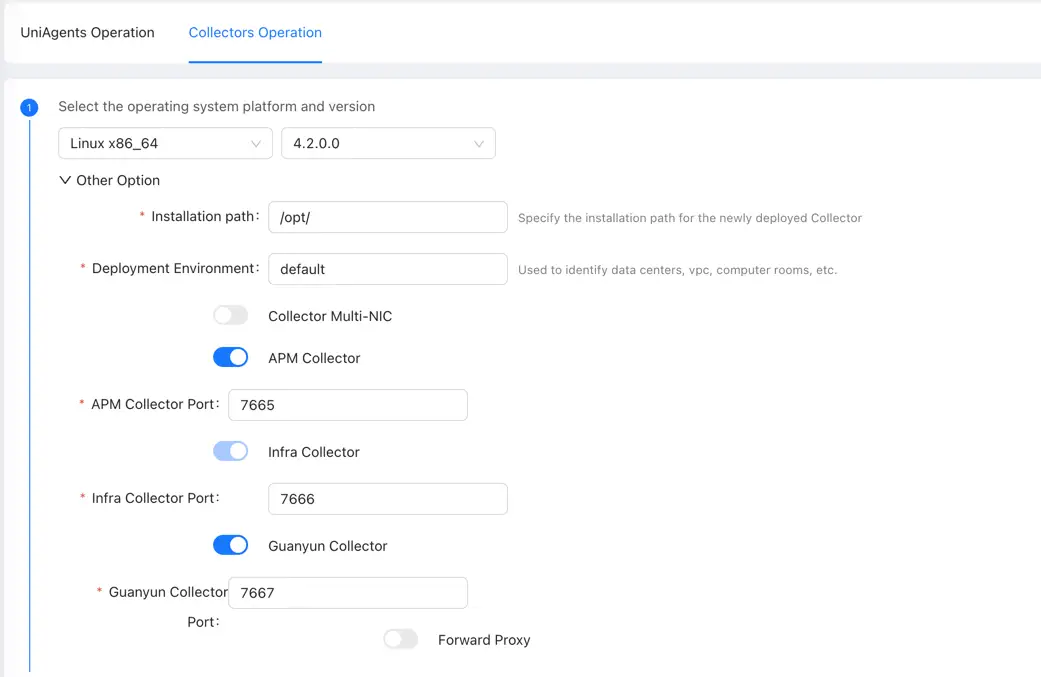
We recommend disabling the APM Collector function to reduce resource contention with OpenTelemetry Trace.
You need to enable the Guanyun Collector function to ingest monitoring data from Zabbix, Prometheus, OpenTelemetry, external data sources, and more.
Install Collector on the target host.
Configuring Collector to Receive OpenTelemetry Data
Entering Collector Installation Directory
cd /opt/tingyun-collector/
Enabling the OpenTelemetry Module (Java Agent Only)
cd conf.d/o11y
cp o11y-processor-exporter.yaml.example o11y-processor-exporter.yaml
Restarting Collector
After modifying the configuration, you need to restart Collector.
sudo systemctl restart tingyun-collector
Embedding the OpenTelemetry Java Agent in a Java Application (Example)
Step 1: Downloading and Extracting the OpenTelemetry Agent
wget https://github.com/open-telemetry/opentelemetry-java-instrumentation/releases/latest/download/opentelemetry-javaagent.jar
Step 2: Modifying JAVA Application Startup Script
java -javaagent:path/to/opentelemetry-javaagent.jar \
     -Dotel.service.name=your-service-name \
     -Dotel.traces.exporter=otlp \ #Set Traces exporter to Collector
     -Dotel.metrics.exporter=otlp \ #Set metric exporter to Collector
     -Dotel.exporter.otlp.protocol=http/protobuf \ #Set exporter to Collector protocol type, grpc is not supported yet
     -Dotel.exporter.otlp.endpoint=http://192.168.1.2:7667 \ #Collector address:port
     -Dotel.resource.attributes=service.port=8080,host.ip=192.168.1.8 #Add custom attributes
otel.service.namerepresents the service name. It is recommended to set it as the application name for easy identification in the dashboard.
otel.exporter.otlp.endpointis the Collector address. The default port is 7667.
otel.resource.attributesdefines custom attributes for filtering. For example,service.portis the application port (optional; useful when multiple applications run on the same host), andhost.ipis the host IP (optional; useful when applications are deployed across multiple hosts).
Validating Data
tail -f /opt/tingyun-collector/logs/guanyun/collector.log
# Check if the log contains "Setting up own telemetry"
grep "Setting up own telemetry" collector.log
Viewing Data in Guanyun Platform
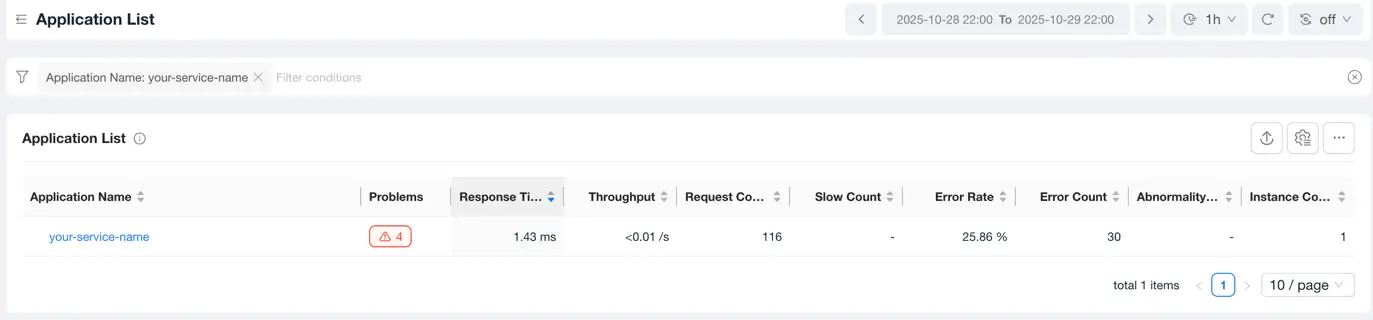
Go to the Entities lite App, select Application model in APM and filter by application name: your-service-name.

Troubleshooting
If no data is visible in the report, you can troubleshoot using the following methods. Note: Remember to restore the configuration after making changes.
Method 1: Enable the monitoring port and check for data reception using the curl command
Modify the Collector configuration file to enable the monitoring port 8888 and check if data is being received. Note: If this port is already in use, you can modify the configuration file to use a different port.
vim /opt/tingyun-collector/conf/guanyun/collector.yaml
Add the configuration content under "readers", comment out the "level" line, and modify the file content as follows:
service:
  telemetry:
    logs:
      level: INFO
      output_paths: ${env:TINGYUN_COLLECTOR_HOME}/logs/guanyun/collector.log
    metrics:
      readers:
        - pull:
            exporter:
              prometheus:
                host: '0.0.0.0'
                port: 8888
     #level: none
After making the changes, restart the Collector.
sudo systemctl restart tingyun-collector
Check if the number of aggregated metrics has increased; an increase indicates normal data reception.
curl http://127.0.0.1:8888/metrics | grep 'sent_metric_points'

Method 2: Output the metrics to a temporary file and check the detailed data.
Modify the Collector configuration file to output metrics to a temporary file address by adding "file".
vim /opt/tingyun-collector/conf/guanyun/collector.yaml
The configuration content is as follows:
exporters:
  debug:
    verbosity: '${env:TINGYUN_GUANYUN_LOGLEVEL}'
  file:
    path: /opt/tingyun-collector/guanyun-collector.json
Modify the configuration file
vim /opt/tingyun-collector/conf.d/o11y/o11y-processor-exporter.yaml
Update exporters to add file.
service:
  pipelines:
    traces/o11y:
      receivers: [otlp]
      processors: [groupbytrace/o11y, groupbyattrs/o11y]
      exporters: [servicegraph, otlphttp/default]
    metrics/servicegraph:
      receivers: [servicegraph]
      processors: [filter/servicegraph, cumulativetodelta/o11y/sg]
      exporters: [otlphttp/default]
    metrics/o11y:
      receivers: [otlp]
      processors: [filter/o11y, transform/o11y, cumulativetodelta/o11y/metric]
      exporters: [file,otlphttp/default]
After making the changes, restart the Collector.
sudo systemctl restart tingyun-collector
Check if the guanyun-collector.json file has any data output.
tail -f /opt/tingyun-collector/guanyun-collector.json