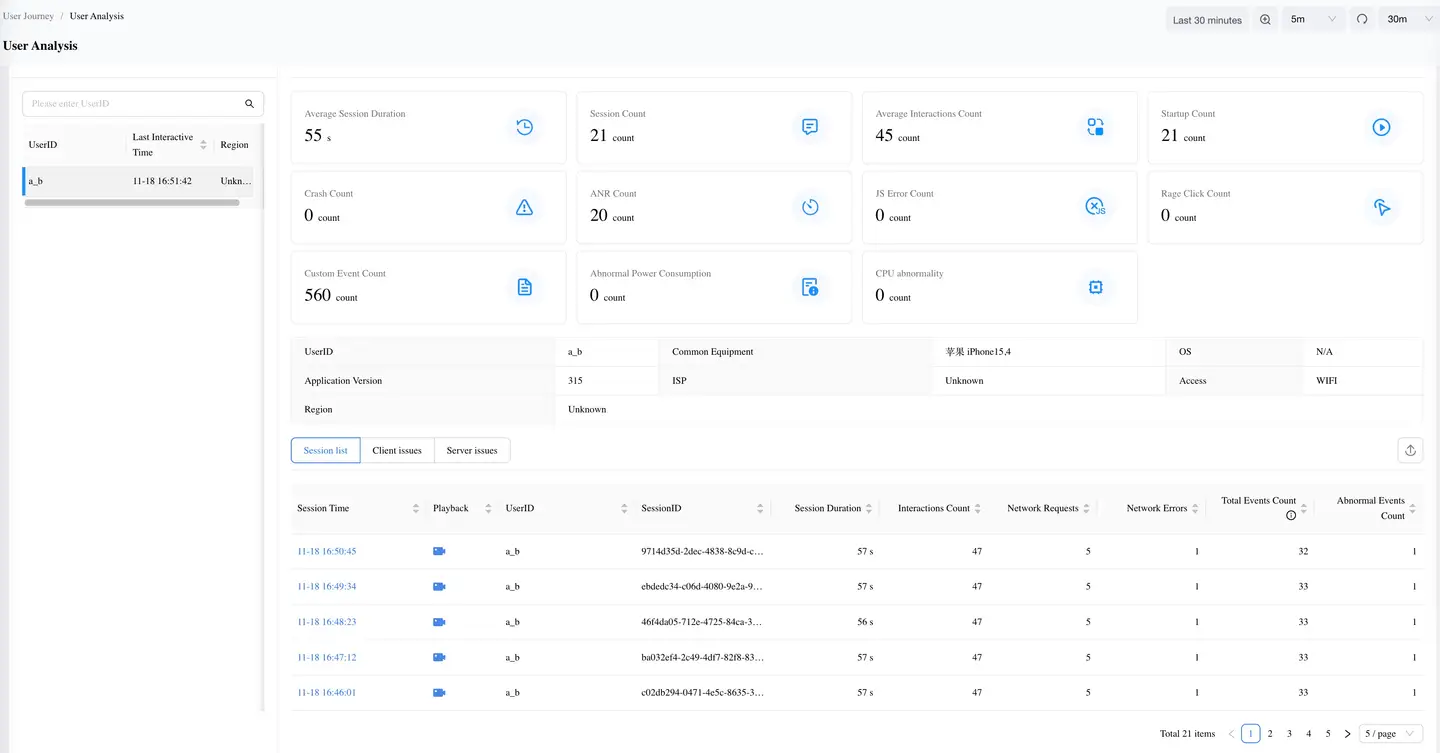
User Analysis
User Analysis provides user-based profiles, session lists, and exception lists from a user perspective, helping you intuitively analyze user issues.
In the navigation bar, select Real User Monitoring > User Journey > User Analysis to enter the User Analysis page, where you can view all user dimension data.
-
User List: Displays user names, last session time, and geographic location with user as the primary dimension. Supports searching by UserID.
-
User Profile: Shows all information about the current user, including: average session duration, session count, average interaction count, launch count, crash count, lag count, JS error count, rapid click count, and custom event count.
The user details section records detailed information uploaded from the last session, including: UserID, commonly used devices, operating system, application version, carrier, access method, and geographic location.
-
Session List: Displays all session data for the current user within the selected time period.
-
Problem List: Shows all problems that occurred for the current user within the selected time period, including: crashes, lags, JS errors, and rapid clicks.