Cross-Domain Configuration
Background Introduction
Trace propagation protocol allows the transmission of tracking information in distributed systems, typically by adding special request headers in HTTP requests to transmit tracking information such as traceId and spanId.
Cross-Origin Resource Sharing (CORS)
CORS (Cross-Origin Resource Sharing) is a mechanism that uses additional HTTP headers to tell browsers to allow a web application running at one origin (domain) to access resources from another origin. To ensure security, browsers perform preflight requests (Preflight Request) for certain cross-domain requests (especially requests with custom headers).
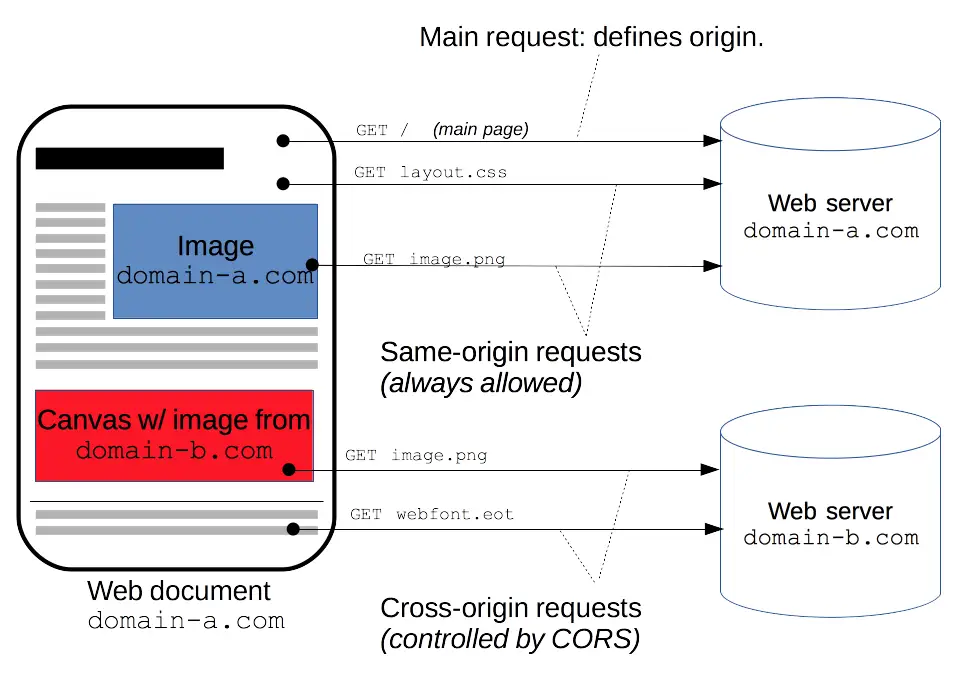
Preflight Request
When using XMLHttpRequest or Fetch API for cross-domain requests, if the request uses one of the following, the browser will first send an OPTIONS request, called a preflight request, to check if the server allows the actual request:
- Uses an HTTP method other than GET, POST, or HEAD.
- Uses custom request headers (i.e., not standard headers listed in the CORS specification, such as Content-Type, Accept, Authorization, etc.).
Since OpenTelemetry needs to add custom tracking information (such as traceparent, tracestate) in the request headers, this will trigger the browser's preflight request.
Example
We have a Tingyun tracking header X-Tingyun, with the following format:
X-Tingyun:c=B|b1t76Pq_FnI;x=4d42de860dc64124;u=base64#c3p3YW5zaGVuZw==
When the browser initiates a cross-domain request containing this request header, it will first send a preflight request:
OPTIONS /api/resource HTTP/1.1
Host: api.example.com
Origin: http://example.com
Access-Control-Request-Method: POST
Access-Control-Request-Headers: X-Tingyun
The server needs to respond allowing the request:
HTTP/1.1 204 No Content
Access-Control-Allow-Origin: http://example.com
Access-Control-Allow-Methods: POST
Access-Control-Allow-Headers: X-Tingyun
If the server allows the preflight request, the browser will send the actual request:
POST /api/resource HTTP/1.1
Host: api.example.com
Origin: http://example.com
X-Tingyun:c=B|b1t76Pq_FnI;x=4d42de860dc64124;u=base64#c3p3YW5zaGVuZw==
Configuration Instructions
NGINX Configuration Example
Assume your backend service runs behind NGINX. We need to configure NGINX to handle preflight requests and allow custom request headers.
server {
  listen 80;
  server_name api.example.com;

  # Define a location block to handle preflight requests
  location /api/ {
    if ($request_method = 'OPTIONS') {
      add_header 'Access-Control-Allow-Origin' '*';
      add_header 'Access-Control-Allow-Methods' 'GET, POST, OPTIONS';
      add_header 'Access-Control-Allow-Headers' 'X-Tingyun';
      add_header 'Access-Control-Max-Age' 1728000;
      add_header 'Content-Length' 0;
      add_header 'Content-Type' 'text/plain charset=UTF-8';
      return 204;
    }
    # Handle actual requests
    add_header 'Access-Control-Allow-Origin' '*';
    add_header 'Access-Control-Expose-Headers' 'X-Tingyun-Data';

    proxy_pass http://backend_service;
    proxy_set_header Host $host;
    proxy_set_header X-Real-IP $remote_addr;
    proxy_set_header X-Forwarded-For $proxy_add_x_forwarded_for;
    proxy_set_header X-Forwarded-Proto $scheme;
  }
}
Configuration Description
- Handling Preflight Requests: In the location /api/ block, we first check if the request method is OPTIONS. If it is, we add CORS-related response headers and return a 204 status code.
- Adding Response Headers: For all requests (including preflight requests and actual requests), we have added
Access-Control-Allow-Origin,Access-Control-Allow-Methods, andAccess-Control-Allow-Headersheaders. These headers allow cross-domain requests and allow including custom headers. - Access-Control-Max-Age: Used to configure the cache time for preflight requests, avoiding sending preflight requests for each request.
- 'Access-Control-Expose-Headers' 'X-Tingyun-Data': This request header is used to generate performance data that the WEB SDK can obtain, configured in a fixed format.
Apache httpd Configuration Example
Enable mod_headers and mod_rewrite modules
In Apache, CORS-related header settings depend on the mod_headers and mod_rewrite modules. First, you need to ensure that these modules are enabled. Find the following lines in the httpd.conf file and make sure they are not commented out.
LoadModule headers_module modules/mod_headers.so
LoadModule rewrite_module modules/mod_rewrite.so
Configure Cross-Domain Settings
<Location /api/>
	  # Handle OPTIONS preflight requests
    <IfModule mod_headers.c>
        SetEnvIf Request_Method OPTIONS preflight
        Header add Access-Control-Allow-Methods "GET, POST, OPTIONS" env=preflight
        Header add Access-Control-Allow-Headers "X-Tingyun" env=preflight
        Header add Access-Control-Max-Age 1728000 env=preflight

        # Return 204 status code for OPTIONS requests
        RewriteCond %{REQUEST_METHOD} OPTIONS
        RewriteRule ^ - [R=204,L]
    </IfModule>

    # Set CORS headers for other requests
    Header add Access-Control-Allow-Origin "*"
    Header add Access-Control-Expose-Headers "X-Tingyun-Data"
</Location>
Testing and Verification
Test Preflight Request
Use tools (such as curl or Postman) to send an OPTIONS request with custom headers, ensuring the server returns the correct CORS headers.
curl -X OPTIONS -H "Origin: http://example.com" -H "Access-Control-Request-Method: POST" -H "Access-Control-Request-Headers: X-Tingyun" http://api.example.com/api/resource
Actual Request
After confirming the preflight request passes, send the actual request to verify all header information is correctly processed.
curl -X POST -H "Origin: http://example.com" -H "c=B|b1t76Pq_FnI;x=4d42de860dc64124;u=base64#c3p3YW5zaGVuZw==" -H "Content-Type: application/json" -d '{"data": "example"}' http://api.example.com/api/resource
With the above configuration, NGINX can correctly handle cross-domain requests containing Tingyun request headers, while complying with the CORS specification.
Configuration Guide
The Web SDK supports multiple vendors and custom trace propagation request headers, so configuration is needed as required.
Get Request Headers to Configure
Access the menu Web/Application/Settings/Trace Tracking, find View Request Headers to Configure and click to copy the popped-up request headers for corresponding cross-domain configuration.


nginx Example Configuration
server {
  listen 80;
  server_name api.example.com;

  # Define a location block to handle preflight requests
  location /api/ {
    if ($request_method = 'OPTIONS') {
      add_header 'Access-Control-Allow-Origin' '*';
      add_header 'Access-Control-Allow-Methods' 'GET, POST, OPTIONS';
      add_header 'Access-Control-Allow-Headers' 'X-Tingyun traceparent, tracestate';
      add_header 'Access-Control-Max-Age' 1728000;
      add_header 'Content-Length' 0;
      add_header 'Content-Type' 'text/plain charset=UTF-8';
      return 204;
    }
    # Handle actual requests
    add_header 'Access-Control-Allow-Origin' '*';
    add_header 'Access-Control-Expose-Headers' 'X-Tingyun-Data';

    proxy_pass http://backend_service;
    proxy_set_header Host $host;
    proxy_set_header X-Real-IP $remote_addr;
    proxy_set_header X-Forwarded-For $proxy_add_x_forwarded_for;
    proxy_set_header X-Forwarded-Proto $scheme;
  }
}
The above configuration declares the trace propagation protocols of two vendors: Tingyun and w3c-context.
Appendix
https://developer.mozilla.org/zh-CN/docs/Web/HTTP/CORS
https://opentelemetry.io/docs/concepts/context-propagation/
https://www.w3.org/TR/trace-context/