How to Calculate TTI
Time to Interactive (TTI) is an important lab metric for measuring loading responsiveness. This metric helps identify pages that appear to be interactive but actually are not. A fast TTI helps ensure the page's usefulness.
What is TTI
TTI (Time To Interactive) is the time from when the page begins loading until it is fully interactive. A page is considered fully interactive when it meets the following 3 conditions:
- The page has displayed useful content.
- Event handlers for visible page elements have been registered.
- Event handlers can begin execution within 50ms after the event occurs.
In many cases, developers often focus only on page rendering-related metrics, such as FP, FCP, etc., while neglecting page usability metrics. TTI is an important indicator reflecting page usability. The smaller the TTI value, the earlier users can operate the page, resulting in a better user experience.
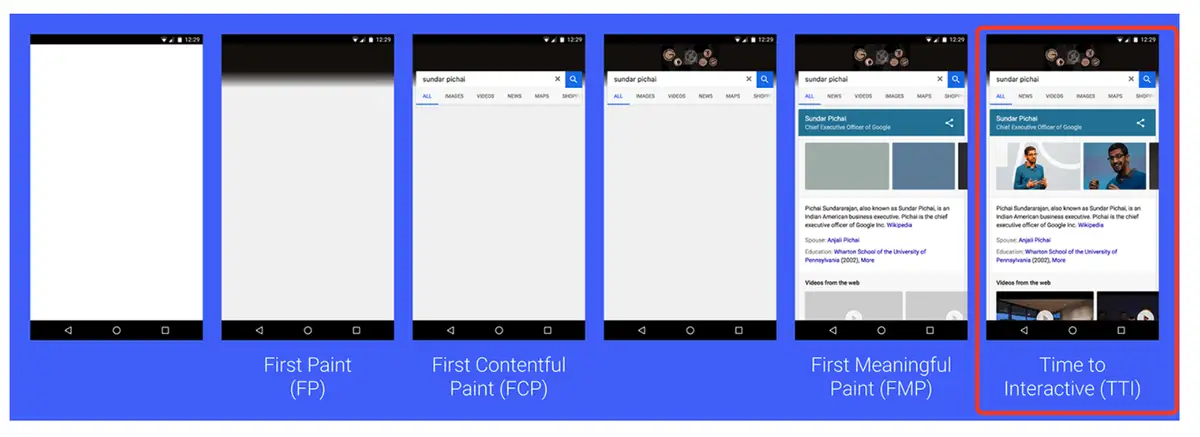
How to Obtain TTI
When users visit a Web page, there are typically two modes:
- Direct synchronous navigation through server-side routing
- SPA page switching through client-side routing
Algorithm Description
Long Task: A task that executes on the browser's main thread for more than 50ms.
Quiet Window: A period of time during which there are no Long Tasks and the number of in-progress network requests does not exceed 2.
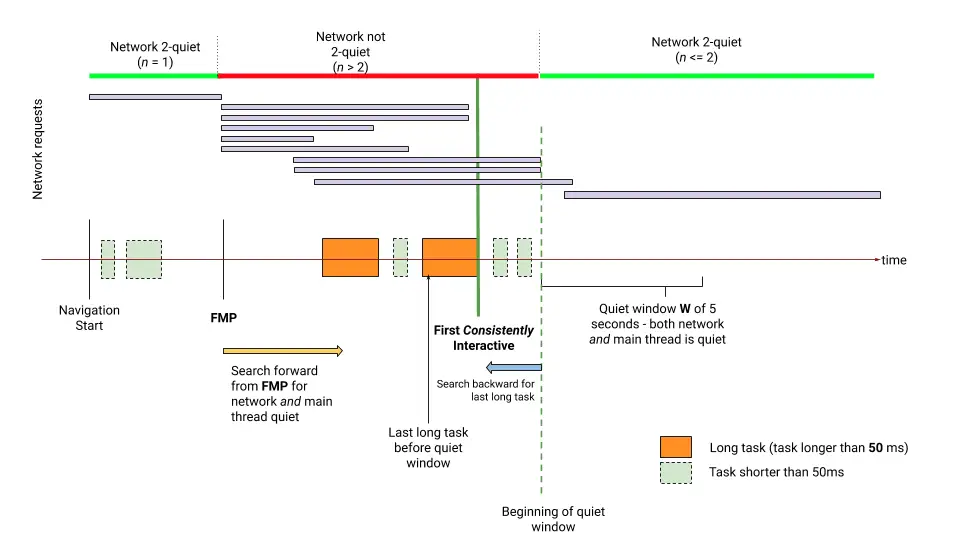
Refer to the illustration above (First Consistently Interactive in the diagram is TTI).
- Starting from the initial point (generally FCP or FMP), search forward for a quiet window period of not less than 5s. A quiet window is a period during which there are no Long Tasks and the number of in-progress network requests does not exceed 2.
- After finding the quiet window, search backward from the quiet window to find the most recent Long Task. The end time of this Long Task is the TTI.
- If no Long Task is found, use the initial point time as the TTI.
- If the TTI obtained in steps 2 or 3 is < DOMContentLoadedEventEnd, use DOMContentLoadedEventEnd as the TTI.
Browser Compatibility Note
The TTI metric requires browser support for the Long Tasks API and Resource Timing API. In cases where the browser is not compatible, the isSupport field in the reported metrics will be false.
How to Optimize TTI
To learn how to improve TTI for a specific website, you can run a Lighthouse performance audit and pay attention to the various specific opportunities suggested by the audit.