How to Calculate LCP
Largest Contentful Paint (LCP) is an important user-centric metric for measuring perceived loading speed, as it marks the point in the page load timeline when the page's main content has likely loaded, a fast LCP helps reassure the user that the page is useful. To provide a good user experience, sites should strive to have Largest Contentful Paint within the first 2.5 seconds of starting to load the page.
Metric Description
The LCP metric reports the render time of the largest image or text block visible within the viewport, relative to when the page first began loading.

Which Elements are Considered by LCP
LCP currently doesn't calculate all elements, as doing so would make this metric very complex. It currently only focuses on the following elements:
<img>elements<image>elements inside<svg>elements<video>elements- Elements with background images loaded via the url() function
- Block-level elements containing text nodes or other inline-level text elements
Note: Limiting elements to this finite set was intentional to keep things simple at the start. More elements may be added in the future as research continues.
How to Calculate LCP
The largest element on a page is the one with the largest paint area, which can be understood as each element's "footprint" on the screen. If an element extends beyond the screen or is partially clipped, the clipped portion is not counted; only what is actually displayed on the screen counts.
The area calculation for image elements is slightly different because images can be enlarged or reduced through CSS, meaning images have two areas: "rendered area" and "intrinsic area". In LCP calculations, the paint area of an image will take the smaller value. For example: when the "rendered area" is smaller than the "intrinsic area", the "paint area" is the "rendered area", and vice versa.
During page loading, which is a linear process, elements are rendered to the screen one by one, not all at once, so the element with the largest "paint area" can change at any time.
If an element is removed, the LCP algorithm will no longer consider that element. If the removed element happened to be the one with the largest "paint area", a new performance entry is created with the new largest "paint area" element.
This process continues until the user first scrolls the page or the first user input (mouse click, keyboard press, etc.), meaning once the user begins to interact with the page, new performance metrics stop being reported.
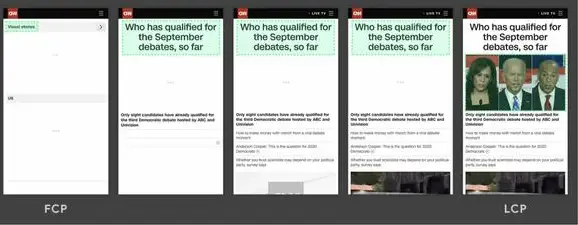
In the timeline above, the largest element changes as content loads. In the first example, new content is added to the DOM, changing the largest element. In the second example, a layout change occurs, removing the previously largest content from the viewport. Typically, lazy-loaded content is larger than content already on the page.
Improving LCP
The most common causes of poor LCP are:
- Slow server response times
- Render-blocking JavaScript and CSS
- Slow resource load times
- Client-side rendering
So we consider improving LCP from the perspectives above.
Optimize the Server
This is easy to understand: the longer it takes for the browser to receive content from the server, the longer it takes to render anything on the screen. Faster server response times directly improve all page load metrics, including LCP.
There is a dedicated metric for measuring server response time: Time to First Byte (TTFB) is the time from when the initial network request is made until the first byte is received from the server. It includes TCP connection time, time to send the HTTP request, and time to get the first byte of the response message. You can try to optimize TTFB in the following ways:
- Cache HTML offline pages, cache page resources, and reduce browser requests for resources.
- Minimize resources that block rendering: compress, merge, cascade, inline CSS and JavaScript, etc.
- Optimize images. Convert images to formats like JPG or WEBP, reduce image size to speed up requests.
- Rewrite, compress spaces, and remove comments from HTML. Reduce HTML size to speed up loading.
- Use preconnect to establish connections with servers quickly, and use dns-prefetch for quick DNS lookups.
- Use CDNs to speed up requests.
Optimize Render-Blocking Resources
JavaScript and CSS are resources that block page rendering. It's necessary to compress CSS and JavaScript files as much as possible, defer loading JavaScript that isn't needed for the first screen, inline critical CSS, etc., to reduce blocking time.
Optimize Resource Load Times
The resources we mentioned above, if rendered on the first screen, will directly affect LCP based on the time it takes to load these elements.
<img>elements<image>elements inside<svg>elements<video>elements- Elements with background images loaded via the url() function
- Block-level elements containing text nodes or other inline-level text elements
You can use the following methods for optimization:
- Optimize images. Convert images to formats like JPG or WEBP to reduce image size.
- Preload important resources, such as adding the rel="preload" attribute to style tags.
- Use Gzip and Brotli compression for page resources to reduce transfer time.
- Use service workers to cache resources.
Server-Side Rendering
Using server-side rendering ensures that page content is first rendered on the server, which can effectively improve LCP. However, compared to client-side rendering, the disadvantage is that it increases page size, affecting TTFB. Server-side rendering requires waiting for all JS to execute before responding to user input, which can worsen the interaction experience.
LCP Algorithm Update
JS Agent version 3.2.2 changed the first screen algorithm to take the LCP time, as LCP better meets business and user experience requirements for the first screen.
The original first screen algorithm calculated when all elements on the first screen were loaded. If you still want to use that algorithm, you can disable LCP in the probe.
Version 3.2.2 and above Agents default to trying to use LCP (largest contentful paint) to calculate the first screen.
How to Disable LCP First Screen Calculation
Disable the LCP algorithm for first screen calculation through the Agent configuration lcp_enable=false.
{
    ...,
    lcp_enable: false
    ...
}
How to Stop LCP PerformanceObserver Early
LCP may trigger multiple times during page loading as larger areas are rendered. The Agent supports stopping continued monitoring of LCP triggers at a certain point in time and recording this time point. If no LCP trigger has been obtained before this or if the LCP algorithm is disabled, then the stop time point is used as the first screen time.
if (window.TINGYUN && window.TINGYUN.stopLCPObserver) {
  window.TINGYUN.stopLCPObserver();
}