How to Calculate FID
First Input Delay (FID) is an important user-centric metric for measuring loading responsiveness, as it quantifies the experience users have when trying to interact with unresponsive pages. A low FID helps ensure users that the page is effective.
What is FID
Long Task Definition: A Task that executes on the browser's main thread for more than 50ms.
Input Delay: Records the time spent on user interactions with the page. For example, the time from when a user clicks a button until the browser correctly processes the button's behavior and provides feedback to the user. Typically, Input Delay occurs because the browser's main thread is busy executing other operations and cannot process the user's interaction.
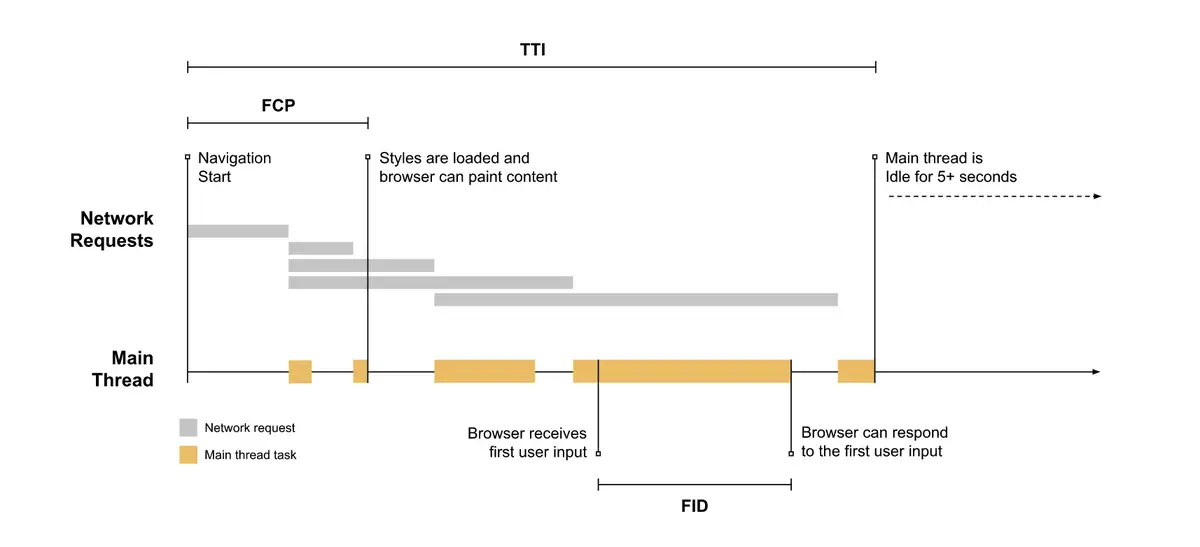
FID measures the time from when a user first interacts with a page, such as when they click a link, tap a button, or use a custom control driven by JavaScript, until the browser responds to the interaction and is actually able to begin processing event handlers.
FID occurs between FCP and TTI because during this phase, although the page has displayed some content, it is not yet fully interactive. During this phase, user interactions with the page often experience significant delays. As shown in the figure below, when the browser receives a user input operation, the main thread is busy executing a Long Task. Only after this Task is completed can the browser respond to the user's input operation.
Although any input delay can disrupt the user experience, we only select FID as a general metric based on the following reasons:
- FID reflects the user's first impression of the page's interactivity and responsiveness. A good first impression helps users build a good impression of the entire application.
- During the page loading phase, resource processing tasks are heaviest and most likely to cause input delays. Therefore, focusing on the FID metric has greater benefits for improving page interactivity.
- FID and Input Delay after page loading have different solutions. For FID, we generally recommend reducing the loading, parsing, and execution time of JS during the page loading phase through methods such as Code Splitting. Input Delay after page loading is usually caused by improper code writing by developers, resulting in excessive JS execution time.
What is a Good FID Score?
To provide a good user experience, websites should strive to have a First Input Delay of 100 milliseconds or less. To ensure you can achieve the recommended target values during most of your users' visits, a good measurement threshold is the 75th percentile of page loads, and this threshold applies to both mobile and desktop devices.
Calculating FID
Calculating FID requires real user interaction with the page and can be measured using the Event Timing API: Create a PerformanceObserver object, listen for the first-input event, and after detecting the first-input event, use the Event Timing API to calculate FID by subtracting the event's occurrence time from the event's processing start time.
Because the value of FID heavily depends on when the user triggers an action, the distribution curve of FID values needs to be considered. Generally, it is recommended to use the 95th percentile metric value, which can reflect the FID value corresponding to the worst user interaction experience.
Browser Compatibility Notes
The FID metric requires browser support for the Event Timing API. In cases of incompatibility, the isSupport field in the reported metrics will be false.
How to Optimize FID
To understand how to improve FID for a specific website, you can run a Lighthouse performance audit and pay attention to the various specific opportunities suggested by the audit.