How to Calculate CLS
Cumulative Layout Shift (CLS) is an important user-centric metric for measuring visual stability, as it helps quantify how often users experience unexpected layout shifts. A lower CLS presents users with a natural interaction flow without delays and stutters.
Metric Description
CLS measures the largest consecutive layout shift scores of all unexpected layout shifts that occur during the entire page lifecycle. A layout shift occurs whenever a visible element changes position from one rendered frame to the next. For more information, see Layout Shift Score.
How is the CLS Score Calculated?
When calculating the layout shift score, the browser looks at the viewport size and the movement of unstable elements in the viewport between two rendered frames. The CLS score is the product of two measures of that movement: the impact fraction and the distance fraction (both defined below).
CLS Score = Impact Fraction * Distance Fraction
Impact Fraction
The impact fraction measures the impact of unstable elements on the viewport between two frames. The union of the visible areas of all unstable elements for the previous frame and the current frame (as a fraction of the total viewport) is the impact fraction for the current frame.
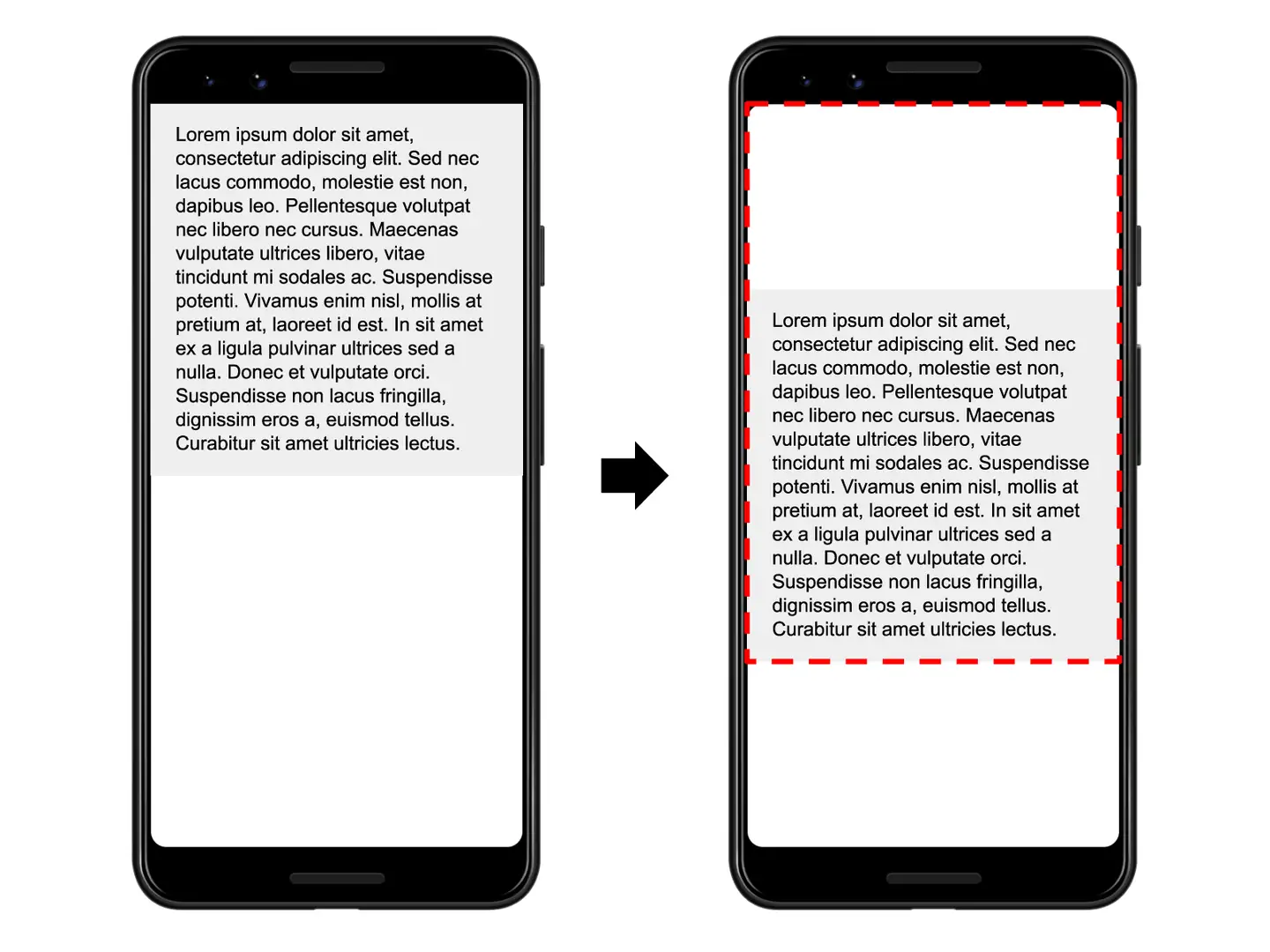
In the above image, an element occupies half of the viewport in one frame. Then, in the next frame, the element shifts down by 25% of the viewport height. The red dotted rectangle represents the union of the element's visible areas in both frames, which in this example occupies 75% of the total viewport, so the impact fraction is 0.75.
Distance Fraction
The other part of the CLS score calculation measures the distance that unstable elements have moved relative to the viewport. The distance fraction is the greatest distance any unstable element has moved in a frame (either horizontally or vertically) divided by the largest dimension of the viewport (width or height, whichever is greater).
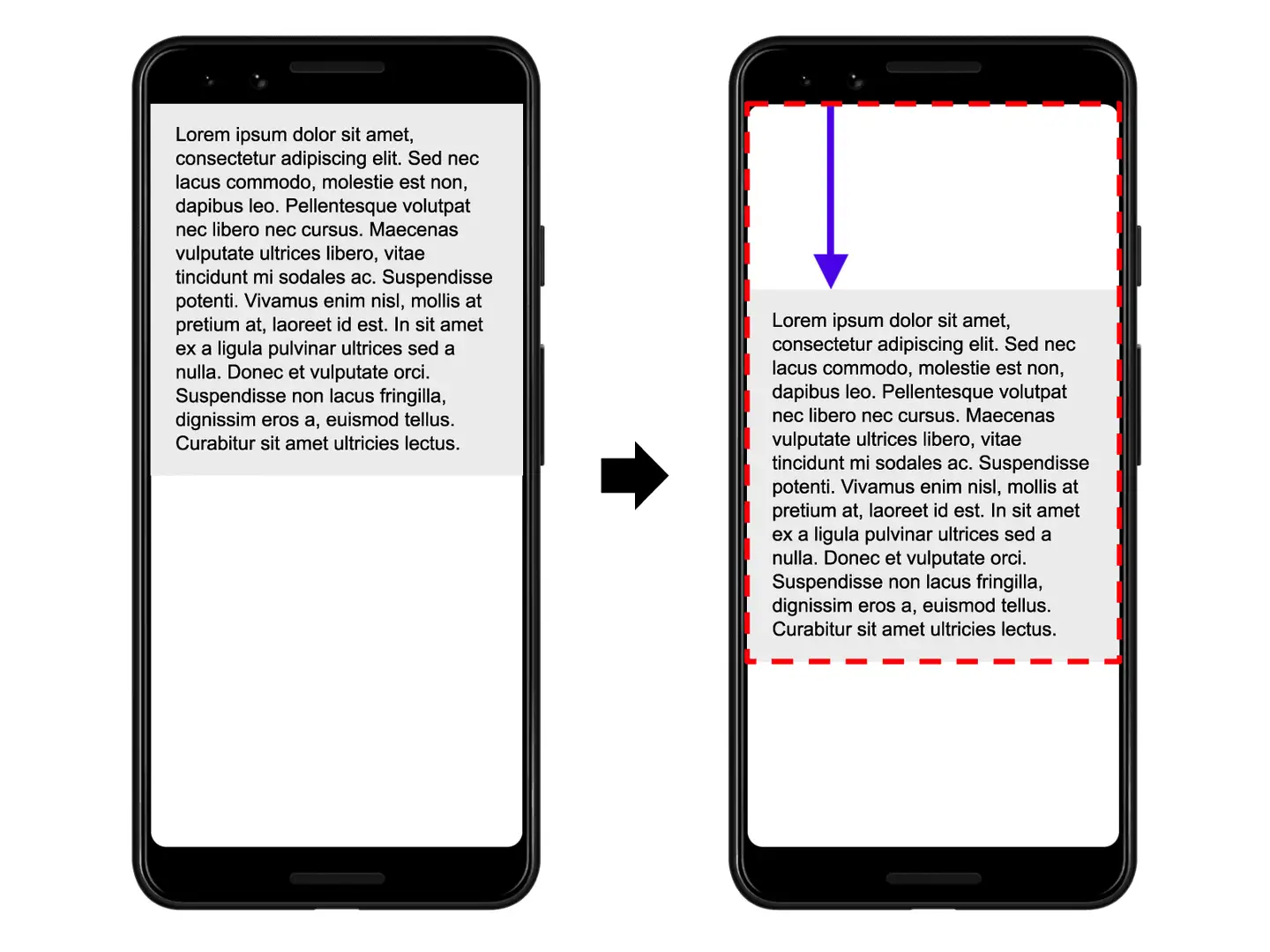
In the example above, the largest viewport dimension is the height, and the unstable element has moved by 25% of the viewport height, so the distance fraction is 0.25.
So, in this example, the impact fraction is 0.75, the distance fraction is 0.25, and the CLS score is 0.75 * 0.25 = 0.1875.
Initially, the CLS score was calculated based only on the impact fraction. The distance fraction was introduced to avoid over-penalizing cases where large elements shift by small amounts.
Expected Layout Shifts vs. Unexpected Layout Shifts
Layout shifts aren't always bad. In fact, many dynamic web applications frequently change the start position of page elements.
User-Initiated Layout Shifts
Layout shifts are only bad when users don't expect them. In other words, layout shifts that respond to user interactions (clicking a link, pressing a button, typing in a search box, etc.) are generally fine, as long as the shift occurs close enough to the interaction that the relationship is clear to the user.
For example, if a user interaction triggers a network request that may take a while to complete, it's best to immediately reserve space and display a loading indicator to avoid an unpleasant layout shift when the request completes. If users aren't aware that something is loading, or don't know when a resource will be ready, they might try to click on something else during the wait (to break the deadlock). Layout shifts that occur within 500 milliseconds of user input will have the hadRecentInput flag, which excludes them from calculations.
Note: The
hadRecentInputflag only applies to discrete input events such as taps, clicks, or keypresses. Continuous interactions such as scrolling, dragging, or pinch-zooming gestures are not considered "recent input." See the Layout Instability Specification for more details.
What is a Good CLS Score?
To provide a good user experience, websites should strive to have a CLS score of 0.1 or less. To ensure you can achieve the recommended target values during most of your users' visits, a good measurement threshold is the 75th percentile of page loads, and this threshold applies to both mobile and desktop devices.
Implementation Details for Metric Collection
Layout Shift is defined by the Layout Instability API, which reports layout shift entries when elements visible in the viewport change their start position between two frames. These elements are considered unstable elements.
Create a PerformanceObserver to use the Layout Instability API to monitor unexpected layout changes.
let clsValue = 0;
let clsEntries = [];
let sessionValue = 0;
let sessionEntries = [];
new PerformanceObserver((entryList) => {
    for (const entry of entryList.getEntries()) {
        // Only count layout shifts without recent user input.
        if (!entry.hadRecentInput) {
            const firstSessionEntry = sessionEntries[0];
            const lastSessionEntry = sessionEntries[sessionEntries.length - 1];
        // If the entry occurred less than 1 second after the previous entry and
        // less than 5 seconds after the first entry in the session, include the
        // entry in the current session. Otherwise, start a new session.
         if (sessionValue
         && entry.startTime - lastSessionEntry.startTime < 1000
         && entry.startTime - firstSessionEntry.startTime < 5000) {
             sessionValue += entry.value;
             sessionEntries.push(entry);
          } else {
              sessionValue = entry.value;
              sessionEntries = [entry];
           }
           // If the current session value is larger than the current CLS value
           // update CLS and the entries contributing to it.
           if (sessionValue > clsValue) {
               clsValue = sessionValue;
               clsEntries = sessionEntries;
               // Log the updated value (and its entries) to the console.
               console.log('CLS:', clsValue, clsEntries)
           }
       }
}}).observe({type: 'layout-shift', buffered: true});
Browser Compatibility Notes
The metric requires browser support for Largest Contentful Paint, Layout Instability API, and PerformanceObserver. In cases of incompatibility, the isSupport field in the reported metrics will be false.
How to Optimize CLS
- Include size attributes on image and video elements, or reserve the required space with something like CSS aspect ratio boxes.
- Never insert content above existing content, except in response to user interaction.
- Use transform animations instead of animation properties that trigger layout changes.