Metrics Description
Web Metrics is a new initiative pioneered by Google, aimed at providing unified guidance for web quality signals that are critical for delivering excellent web user experiences.
Over the years, Google has provided many performance measurement and reporting tools. Some developers are proficient in using these tools, while others find the large number of tools and metrics overwhelming.
Website owners don't need to be performance experts to understand the quality of experience they provide to users. The Web Metrics initiative aims to simplify the scenario and help websites focus on the most important metrics, namely Core Web Vitals.
Core Web Vitals
Core Web Vitals are a subset of Web metrics that apply to all web pages, which all website owners should measure, and these metrics will also be displayed in all Google tools. Each Core Web Vital represents a different aspect of the user experience, can be measured in practice, and reflects the true experience of user-centered key outcomes.
The composition of Core Web Vitals will evolve over time. The current metric composition for 2020 focuses on three aspects of user experience: loading performance, interactivity, and visual stability, and includes the following metrics (and their respective thresholds):
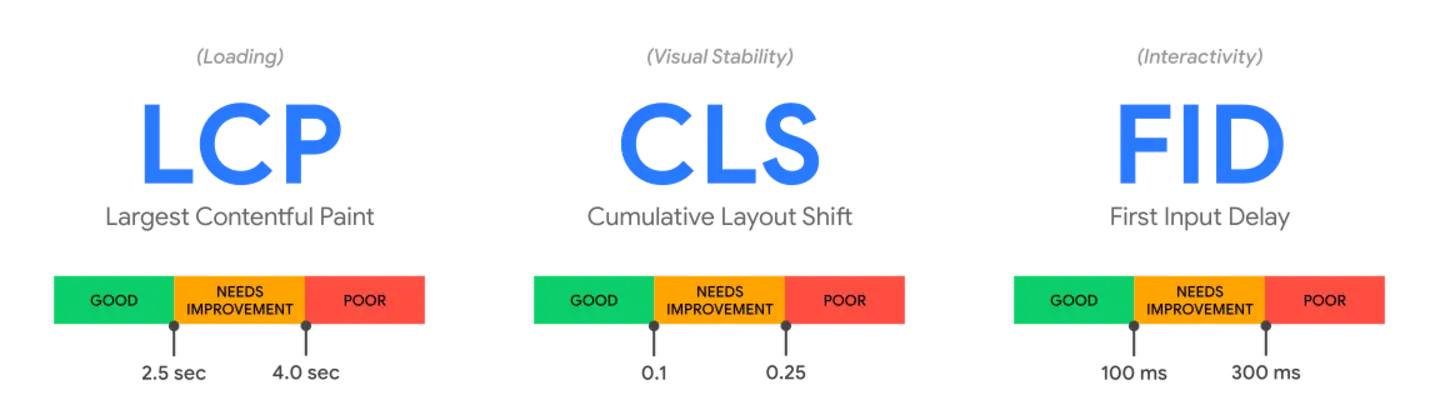
- Largest Contentful Paint (LCP): Measures loading performance. To provide a good user experience, LCP should occur within 2.5 seconds of when the page first begins to load.
- First Input Delay (FID): Measures interactivity. To provide a good user experience, pages should have a FID of 100 milliseconds or less.
- Cumulative Layout Shift (CLS): Measures visual stability. To provide a good user experience, pages should maintain a CLS of 0.1 or less.
To ensure you can achieve the recommended target values during most of your users' visits, a good measurement threshold for each of the above metrics is the 75th percentile of page loads, and this threshold applies to both mobile and desktop devices.
If a page meets the 75th percentile of all three metrics' recommended target values, tools that assess Core Web Vitals compliance should evaluate the page as passing.
Page Performance Monitoring
| Metric | Description | Calculation Formula |
|---|---|---|
| FP | First Paint, the time point of the first rendering. In performance statistical metrics, the time from when the user starts accessing the Web page to the FP time point can be viewed as the white screen time. This means that during the user's access to the Web page, before the FP time point, the user sees a white screen with no content, and the user cannot perceive any effective work being done during this phase. | - |
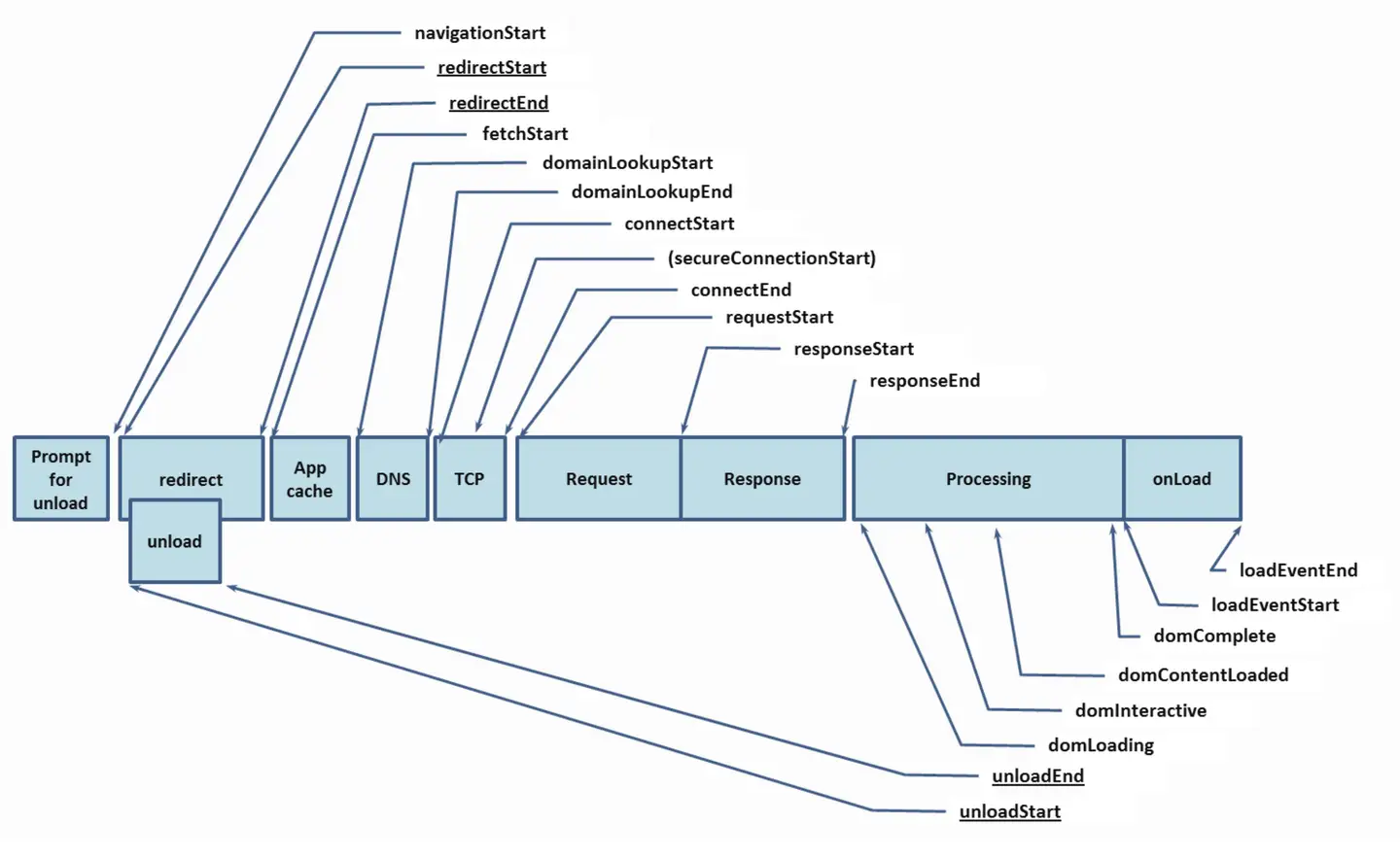
| TTFB | Time To First Byte, the network request time for the first byte. The time from sending the page request to receiving the first byte of response data. | responseStart-fetchStart |
| FCP | First Contentful Paint, the time point when content is first rendered. In performance statistical metrics, the time from when the user starts accessing the Web page to the FCP time point can be viewed as the no-content time. This means that during the user's access to the Web page, before the FCP time point, the user sees a screen without any actual content, and the user cannot obtain any useful information during this phase. | - |
| LCP | Largest Contentful Paint, the time when the largest content element in the viewport is visible. It can be used to determine when the main content of the page has finished rendering on the screen. | - |
| CLS | Cumulative Layout Shift, a measure of the maximum layout shift score for each unexpected layout change that occurs throughout the entire lifecycle of the page. | - |
| FID | First Input Delay, measures the delay time of the user's first interaction with the page, which is the time from when the user first interacts with the page until the browser can actually begin to process event handlers in response to that interaction. | - |
| TTI | Time to Interactive, a non-standardized Web performance "progress" metric, defined as the time point when the last "longtask" is completed, followed by 5 seconds of network and main thread inactivity. | - |
| TBT | Total Blocking Time, a metric that measures the total time between FCP and TTI during which the main thread is blocked for too long to respond to input. | - |
| LoadEventEnd | Load event end. | loadEventEnd-fetchStart |
| Complete Load | After DCL is completed, it will monitor asynchronous requests initiated within a certain period of time (default 500ms) and monitor the time it takes to fully load. This can be considered as the time it takes for the page to be completely loaded. | - |
| DCL | DOMContentLoaded, measures the time point when the browser is ready to execute any client-side scripts. DCL is the time during the web page loading process when the browser has assembled the DOM (Document Object Model) and no style sheets are blocking JavaScript execution. | - |
| Redirect | If no redirect occurs, or one of the redirects is not same-origin, this value is 0. | redirectEnd - redirectStart |
| DNS | Domain name resolution time (0 when resolution cache is hit). | domainLookupEnd - domainLookupStart |
| TCP | TCP connection time. | connectEnd - connectStart |
| SSL | SSL secure connection time. | connectEnd - secureConnectionStart |
| Request | After the SSL connection is established, the time from the client sending to the server's first response. | responseStart - requestStart |
| Response | The time from the server's first response to the data being completely responded. | responseEnd - responseStart |
Page Analysis Metrics
| Metric | Description | Calculation Formula |
|---|---|---|
| Slow Page Count | Number of page visits exceeding the slow page threshold. | Page visits exceeding slow FCP threshold + exceeding slow LCP threshold + exceeding slow DCL threshold + exceeding slow Complete Load threshold |
| Slow Page Percentage | Proportion of page visits exceeding the slow page threshold to total visits. | (Page visits exceeding slow thresholds (slow FCP, slow LCP, slow DCL, slow Complete Load) / total visits) * 100% |
| Slow Page Affected User Count | UV experiencing slow pages | - |
Operation Analysis Metrics
| Metric | Description | Calculation Formula |
|---|---|---|
| Operation Count | Number of times the operation is requested. | When an operation is requested once, it is recorded as 1 time. |
| Operation Time | Time for the operation to complete. | For operations with Ajax requests, the end time of the last Ajax in the operation - the start time of the first Ajax. For page operations, the completion time of user-defined page metrics such as FCP/LCP/DCL/Complete Load is the operation time. |
| Operation Availability | Proportion of successful operations to total operations. | (Number of successful operations / Total number of operations) * 100% |
| Operation Request Time | The projection time of the requests corresponding to the operation. | - |
| Average Server Time | Time from the server receiving the request to completing the processing. | - |
User Analysis Metrics
| Metric | Description |
|---|---|
| PV | Page View, number of page visits. |
| UV | User View, number of user visits. |
| Session | Number of user session visits, counted as one session from entering the page to closing the page. |
JS Error Metrics
| Metric | Description |
|---|---|
| JS Error Count | Number of PVs where JS errors occurred |
| JS Error Rate | Number of PVs where JS errors occurred / Total PV |
| Affected User Count | Number of UVs experiencing JS errors |
Request Analysis Metrics
| Metric | Description |
|---|---|
| Response Time | Time from when the request is sent until the server returns and the result is received |
| Request Count | Number of requests accessing the application |
| Slow Request Percentage | Number of requests exceeding the slow request threshold / Total reported requests |
| Slow Request Affected User Count | UV experiencing slow requests |
| Error Rate | Number of requests with status code 400 and above / Number of requests |
| Error Affected User Count | Number of UVs experiencing request errors |