Modules
Overview
The Modules feature provides business teams with the ability to monitor user experience from a business perspective, supporting the customization of page combinations from multiple applications to create modules for cross-application business performance analysis. This helps business teams evaluate user experience from a business scenario perspective rather than being limited to individual technical application viewpoints.
Core Values
- Business-Centric Monitoring: View user experience from business scenarios rather than technical applications
- Cross-Application Analysis: Aggregate data from multiple applications to uniformly monitor complete business experience
- Flexible Composition: Customize rules to quickly combine any pages into modules
What is a Module
A module is a monitoring unit composed of selected related pages from one or more applications within the same touchpoint based on business logic.
Examples
| Business Scenario | Applications Involved | Composition Rule | Business Value |
|---|---|---|---|
| Real Estate - New Properties | Main Web + Mobile Web | All pages containing /new-house/ | Unified monitoring of new property business user experience |
| E-commerce - Payment Flow | PC Web + Mobile Web | Pages containing /checkout/, /payment/ | Understand payment flow user experience |
| Finance - Account Opening | WeChat Mini Program + Alipay Mini Program | Match all steps in /account/open/ | Optimize account opening flow user experience |
| Education - Course Learning | Main Web + Course Sub-site Web | Contains /course/, /learn/ | Improve course learning experience |
Technical Requirements
- Supported Scope: RUM - Web Applications, MP (Mini Program) Applications
- Integration Requirement: Applications must have MP JS or Web JS integrated
- Data Aggregation: Supports data aggregation from multiple applications within a single touchpoint
Important Limitation: Moduless can only be created within a single touchpoint. For example, you can only select multiple applications under the Web touchpoint, or only select multiple applications under the MP touchpoint. Cross-touchpoint aggregation is not supported (Web + MP mixing is not allowed).
Use Cases
Case 1: Unified Multi-Application Experience Monitoring
The same business is implemented across multiple applications within the same touchpoint and requires unified monitoring and comparison.
Practical Example:
- Search functionality is implemented on both PC Web and Mobile Web (both belong to Web touchpoint)
- Create "Search Function-Web" business module to aggregate search pages from both sites
- Discovered mobile site search is 1.5x slower than PC site
- After targeted optimization, experience on both sites converged
Comparing Different Touchpoints:
- To compare Web and Mini Program search experience, create two separate modules
- Module 1: "Search Function-Web" (Web touchpoint)
- Module 2: "Search Function-MP" (MP touchpoint)
Case 2: Product Line Performance Comparison
An enterprise has multiple product lines and needs to horizontally compare user experience across them.
Practical Example:
- Real estate Web business divided into: New Properties, Second-hand Properties, Rentals (all Web touchpoint)
- Created three separate business modules (all under Web touchpoint)
- Discovered Rental module score significantly lower than other product lines
- Targeted resource investment for optimization, Rental business score improved by 15 points
Core Features
1. Module Overview
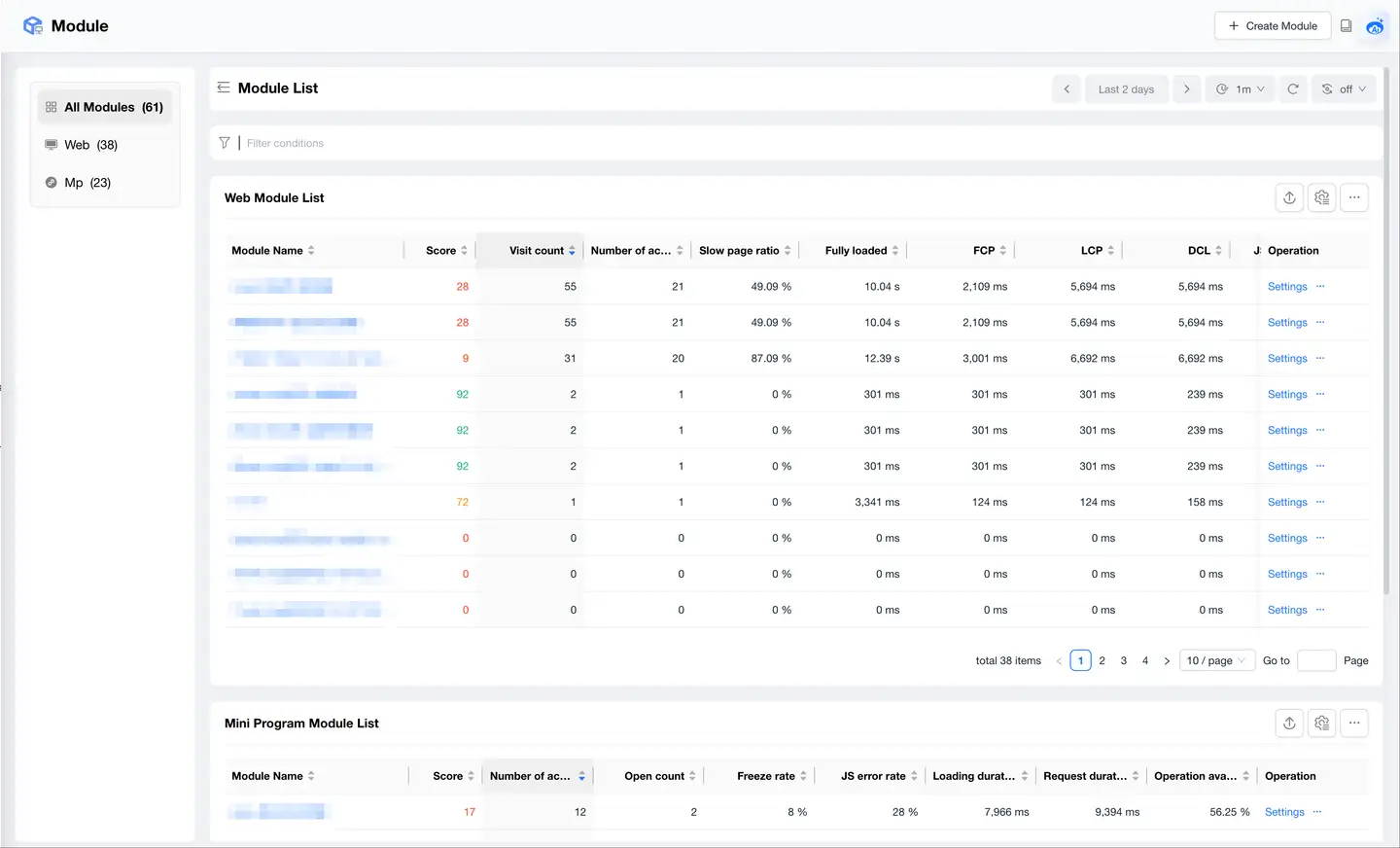
Module overview displays core performance metrics for all business modules, supporting quick comparison and issue detection.
Application Scenarios
Quick Comparison
- Horizontally compare performance across business modules
- Identify modules with low scores or many anomalies
- Evaluate user experience differences across business lines
Issue Alerts
- Supports alerts to quickly discover anomalous modules
- Modules with high slow page ratios need optimization
- High JS error rates impact user experience
Business Decisions
- PV/UV data supports traffic analysis
- User experience scores support resource allocation
- Performance comparisons support business priority decisions
2. Create Modules
Modules creation supports flexible rule configuration to meet various business scenario requirements.
Step 1: Add Module Name
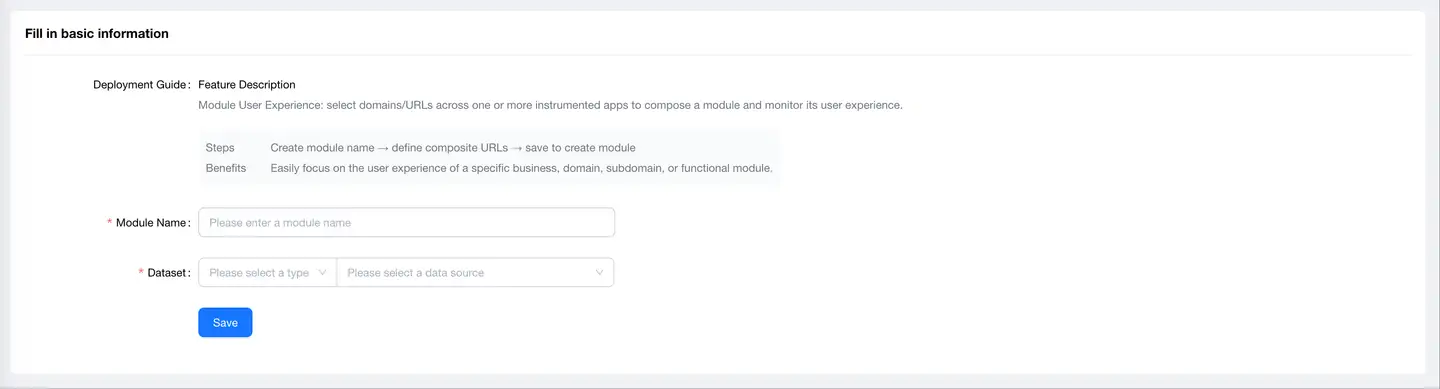
Access Path: Lite Apps → Modules → Top Right【Add Module】
Naming Recommendations
- Use business language rather than technical terms (e.g., "New Property Business" rather than "new-house-app")
- Clearly express business meaning (e.g., "Payment Flow", "Search Function")
- Standardize naming for easier management (e.g., "E-commerce-Cart", "Finance-Account Opening")
Step 2: Select Dataset

Feature Description
Select application data sources to aggregate, supporting:
- Data Type (single selection): Web Applications, MP (Mini Program) Applications
- Data Sources (multiple selection): Can select one or more applications
- Cross-Application Aggregation: Achieve data aggregation for complete business processes
Selection Strategy
| Scenario | Selection Strategy | Example |
|---|---|---|
| Single Application Business | Select a single application | Only a functional module on the main Web site |
| Multi-Application Business (Web Touchpoint) | Select multiple Web applications from the same touchpoint | PC Main Site + Mobile Site + Special Topic Site (all Web) |
| Multi-Application Business (MP Touchpoint) | Select multiple Mini Program applications from the same touchpoint | WeChat Mini Program + Alipay Mini Program + Baidu Mini Program |
Important Limitations
- Can only select applications of the same touchpoint type
- Web touchpoint and MP touchpoint cannot be mixed
Notes
- Only displays applications that are integrated and have data reporting
- Applications must be Web or MP type, cannot simultaneously select Web applications and Mini Programs
- After saving, aggregation rules can be configured
Step 3: Add Aggregation Rules
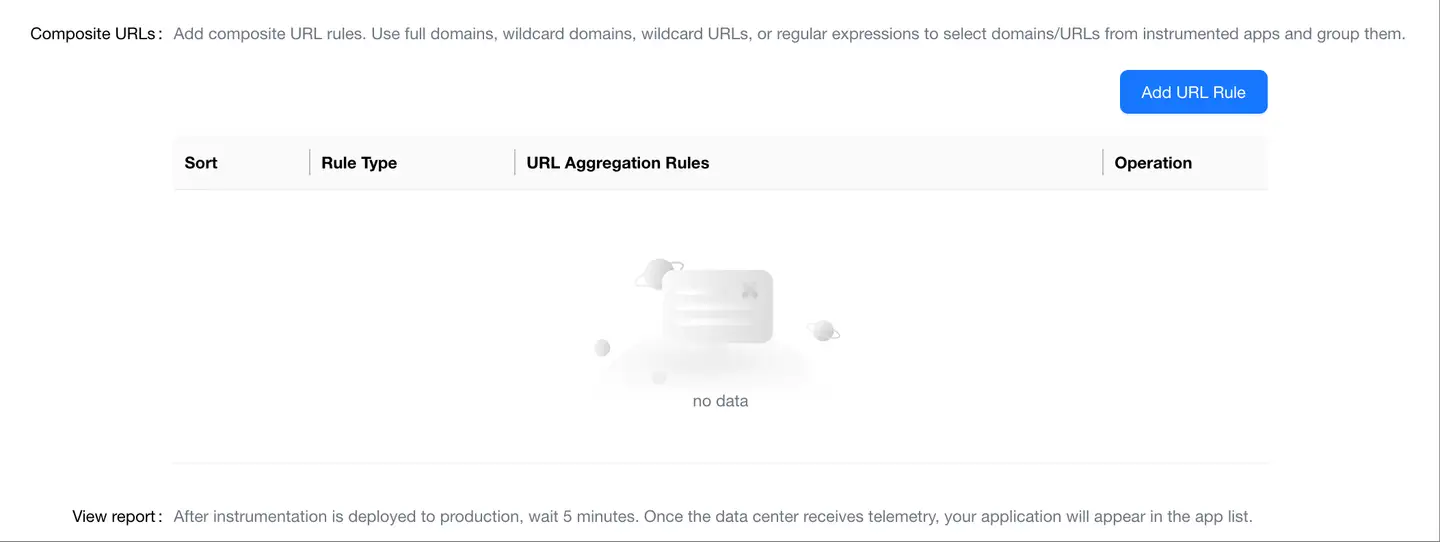
Rule Types
Moduless support three URL matching rule types:

1. Contains Rule
- Description: URL contains specified string
- Example: Contains
/product/matches all product-related pages - Use: Simple scenarios, fixed path matching
2. Regular Expression Rule
Use Java regular expressions for flexible matching.
| Rule | Description | Matching Examples |
|---|---|---|
^/user/get.* | Match paths starting with /user/get | /user/getInfo/uid_1001/user/getCard/cid_01 |
^/user/(get|set).* | Match get or set operations | /user/getInfo/uid_1001/user/setInfo/uid_1001 |
.*/product/[0-9]+$ | Match product details (numeric ID) | /shop/product/12345/mall/product/67890 |
^/(order|pay)/.* | Match order or payment related pages | /order/detail/123/pay/confirm/456 |
3. Wildcard Rule
Use wildcards to quickly define matching patterns.
Wildcard Description
| Wildcard | Description | Example |
|---|---|---|
? | Matches any single character | p?ttern matches pattern, pXttern |
* | Matches 0 or any number of characters | *.jsp matches all JSP files |
** | Matches 0 or more directories | **/example matches example under any path |
Matching Examples
| Rule | Matching Results |
|---|---|
mall.tingyun.com/app/*.x | Matches all .x files under the app path of mall.tingyun.com domain |
127.0.0.1:8080/app/p?ttern | Matches 127.0.0.1:8080/app/pattern and 127.0.0.1:8080/app/pXtternDoes not match /app/pttern |
*/**/example | Matches mall.tingyun.com/app/example127.0.0.1:8080/app/foo/example127.0.0.1:8080/example |
mall.tingyun.com/app/**/dir/file.* | Matches mall.tingyun.com/app/dir/file.jspmall.tingyun.com/app/foo/dir/file.htmlmall.tingyun.com/app/foo/bar/dir/file.pdf |
**/*.jsp | Matches all .jsp files under any path |
Step 4: Save Configuration
After successful save, the system starts collecting and aggregating data:
- Open the integrated application and visit the configured business scenarios
- Wait approximately 5 minutes
- Modules begins displaying data
Tip: Rules take effect immediately after configuration, but require time to accumulate data.
Rule Configuration Best Practices
1. Rule Design Principles
Business Completeness
- Include all key pages in the business process
- Do not miss core conversion paths
- Cover the complete user experience journey
Rule Accuracy
- Avoid overly broad rules that match irrelevant pages
- Avoid overly strict rules that miss key pages
- Test and verify rule matching effectiveness
Maintainability
- Use clear rule comments
- Keep rules concise and understandable
- Facilitate future adjustments and extensions
2. Common Business Scenario Configurations
Scenario 1: Feature Module Monitoring (Web Touchpoint)
Requirement: Monitor search function experience (PC Web + Mobile Web, including search box, search results, filtering pages)
Configuration Example
Dataset: Select multiple applications under Web touchpoint (PC site, Mobile site)
Rule Type: Regular Expression
Rule: ^/search/.*
Description: Match all search-related pages
Scenario 2: Business Flow Monitoring (Web Touchpoint)
Requirement: Monitor complete ordering flow (PC Web + Mobile Web, from cart to payment success)
Configuration Example
Dataset: Select applications under Web touchpoint (PC site, Mobile site)
Rule Type: Regular Expression
Rule: ^/(cart|checkout|payment|order)/.*
Description: Match cart, checkout, payment, order pages
Scenario 3: Campaign Page Monitoring (MP Touchpoint)
Requirement: Monitor all Mini Program campaign pages for Double 11 event
Configuration Example
Dataset: Select Mini Program applications under MP touchpoint (WeChat, Alipay)
Rule Type: Regular Expression
Rule: ^/(activity|event)/2025-double-11/.*
Description: Match 2025 Double 11 campaign pages
3. Rule Debugging Techniques
Verify Rule Correctness
-
Start with Small-Scale Testing
- Visit expected pages after configuring rules
- Check if correctly matched
- Expand scope after confirmation
-
Check Match Count
- Review module PV count
- Compare with expected traffic
- Adjust if too many or too few
-
Identify Missing Pages
- Compare with business process, check one by one
- Review original application's page list
- Supplement rules for missing pages
Common Issue Handling
| Issue | Cause | Solution |
|---|---|---|
| Rule not effective | Syntax error, path mismatch | Check regex syntax, confirm URL format |
| Too many matched pages | Rule too broad | Tighten rule, add constraints |
| Missing key pages | Rule too strict | Relax rule, use OR conditions |
| Inaccurate data | Rule conflicts | Organize rules, avoid duplicate matching |
Module Analysis
Feature Description
Module analysis functions are consistent with Web and MP applications in "Terminal Applications"
Differences from Application Analysis
Data Scope
- Application Analysis: All data from a single application
- Module Analysis: Business data filtered by rules (can span multiple applications)
Analysis Perspective
- Application Analysis: Technical perspective, application-based
- Module Analysis: Business perspective, business process-based
Application Value
- Application Analysis: Suitable for R&D teams for technical optimization
- Module Analysis: Suitable for business teams for business optimization
Analysis Methods
1. Business Health Assessment
- Review module scores to assess overall business quality
- Compare scores across different Moduless
- Identify businesses requiring optimization
2. Business Process Optimization
- Review page performance in business process order
- Identify performance bottlenecks in the process
- Optimize key conversion nodes
3. Cross-Platform Experience Comparison
- Compare performance of the same business on different platforms
- Assess multi-platform experience consistency
- Optimize platforms with poor experience
Business Application Scenarios
Scenario 1: Product Line Resource Allocation
Decision Process
1. Create modules for each product line
   ↓ e.g., New Properties, Second-hand, Rentals

2. Compare module scores
   ↓ Identify underperforming product lines

3. Analyze traffic and value
   ↓ Combine PV/UV with business value

4. Develop optimization plan
   ↓ Prioritize high-value, low-score modules
Decision Example
- New Properties: Score 85, PV 1M, high value
- Rentals: Score 68, PV 500K, medium value
- Decision: Prioritize Rentals module optimization (high cost-effectiveness)
Scenario 2: Campaign Operations Assurance
Pre-Campaign
- Create campaign module, configure campaign page rules
- Load test to verify performance, set alert thresholds
- Prepare emergency response plans
During Campaign
- Real-time monitoring of module scores and core metrics
- Focus on slow page ratios and JS error rates
- Respond quickly to anomalies, ensure campaign success
Post-Campaign
- Evaluate performance during campaign
- Summarize issues and optimization insights
- Provide reference for next campaign
Scenario 3: Multi-Touchpoint Experience Comparison
Comparison Process
1. Create modules for different touchpoints for same business
   ↓ e.g., Search Function-Web (PC + Mobile Web)
   ↓ Search Function-MP (WeChat Mini Program + Alipay Mini Program)

2. Review performance metrics for each touchpoint
   ↓ Identify touchpoints with poor experience

3. Analyze difference causes
   ↓ Technical implementation, network environment, platform characteristics

4. Establish consistency standards
   ↓ Achieve unified performance standards across touchpoints
Best Practices
Modules Planning
Planning Principles
- Core Business First: Prioritize creating modules for core conversion flows
- Appropriate Granularity: Not too coarse (entire website) or too fine (single button)
- Continuous Iteration: Adjust modules based on business changes
Recommended Modules
| Business Type | Recommended Pages | Description |
|---|---|---|
| E-commerce | Homepage, Search, Product Details, Shopping Cart, Payment Flow | Covers complete user purchase journey |
| Finance | Homepage, Account Opening, Deposit, Trading, Withdrawal | Covers complete fund transaction flow |
| Content | Homepage, Categories, Details, Playback, Comments | Covers complete content consumption journey |
| Local Services | Homepage, Search, Stores, Ordering, Reviews | Covers complete service consumption journey |
| Enterprise Services | Homepage, Products, Registration, Trial, Purchase | Covers complete customer conversion journey |
FAQ
Q1: Can a page belong to multiple moduless?
A: Yes. The same page can be matched by rules from multiple moduless.
Example Scenario
- Page:
/product/12345 - Matched by Module 1: "Product Details" (Rule:
^/product/.*) - Matched by Module 2: "Double 11 Campaign" (Rule:
/product/.*\?activity=1111)
Notes
- Data is not double-counted, each module tracks independently
- Design rules reasonably to avoid unintended matches
- Too many duplicates may impact data query performance
Q2: What's the difference between Modules and Application Analysis?
A: The difference is primarily in analysis perspective and data scope.
Comparison
| Dimension | Application Analysis | Modules Analysis |
|---|---|---|
| Perspective | Technical perspective | Business perspective |
| Scope | All data from a single application | Business data filtered by rules |
| Granularity | Application level | Business function level |
| Cross-Application | Not supported | Supports aggregation across multiple applications |
| Users | R&D, Operations teams | Business, Product, Marketing teams |
| Focus | Technical metrics, code issues | Business metrics, user experience |
Usage Recommendations
- R&D Teams: Use application analysis to locate technical issues
- Business Teams: Use module analysis to evaluate business performance
- Collaborative Optimization: Combine both for comprehensive analysis
Q3: How to verify if rule configuration is correct?
A: Verify through the following methods:
1. Test Access
- After configuring rules, visit expected matching pages
- Wait 5 minutes
- Check if module has data reporting
2. Check PV Count
- Compare module PV with expected traffic
- Too many PVs: Rule too broad
- Too few PVs: Rule missing pages or too strict
3. Review Page List
- Enter module's page analysis
- View actual matched page list
- Confirm if it meets business expectations
4. Incremental Debugging
- Configure simple rules first, verify basic functionality
- Gradually add complex rules
- Verify after each adjustment
Q4: Can module rules be modified?
A: Yes, but be mindful of data continuity.
Modification Method
- Enter module list
- Find the module to modify
- Edit rule configuration
- Save to take effect
Notes
- After rule modification, new data is collected according to new rules
- Historical data still follows old rule statistics
- Rule changes will cause breakpoints in data trends
Recommended Approach
- Major rule adjustments: Create new module, keep old module for a period
- Minor adjustments: Modify directly and record change time
- When comparing analysis: Note the timestamp of rule changes
Q5: Why is module data inconsistent with application data?
A: This is normal, for the following reasons:
Different Data Scope
- Application data: Includes all pages of the application
- Module data: Only includes pages matched by rules
- Module data ≤ Application data
Different Aggregation Rules
- Application data: Aggregated by application
- Module data: Aggregated by business rules (can span multiple applications within same touchpoint)
- Same page may belong to different analysis dimensions
Touchpoint Limitations
- Modules can only aggregate application data from the same touchpoint
- Web touchpoint and MP touchpoint cannot be mixed in the same module
Verification Methods
- Check if rule configuration is correct
- Confirm time ranges are consistent
- Compare specific page data
- Contact technical support for confirmation