Deployment Guide
Get Tingyun SDK
CocoaPods Integration
Add the following code to the Podfile file in your project:
pod 'tingyunApp'

//Optional features
pod 'NBSGMKit'    	// SDK uses national encryption for data transmission
pod 'TingyunLog'  	// Log retrieval functionality
pod 'NBSOOM'        // OOM crash collection functionality
pod 'NBSReplayKit'	// Video replay functionality
pod 'NBSCPUMonitorKit' // CPU monitoring
After saving, execute pod install.
Manual Integration
-
After extracting, drag tingyunApp.xcframework to the xcode project and check "Copy items if needed".


-
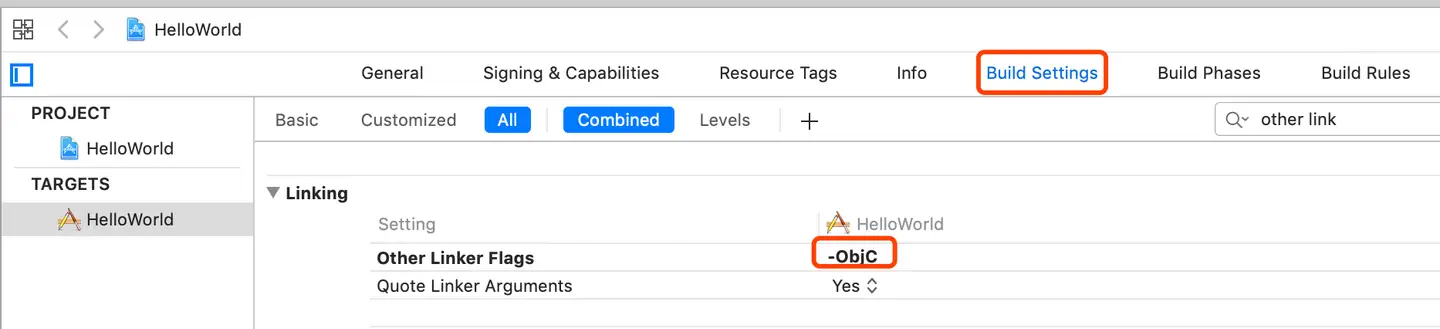
Select project TARGETS → Build Settings → Search for "Other Linker Flags" and add the compilation flag 【-ObjC】.
-
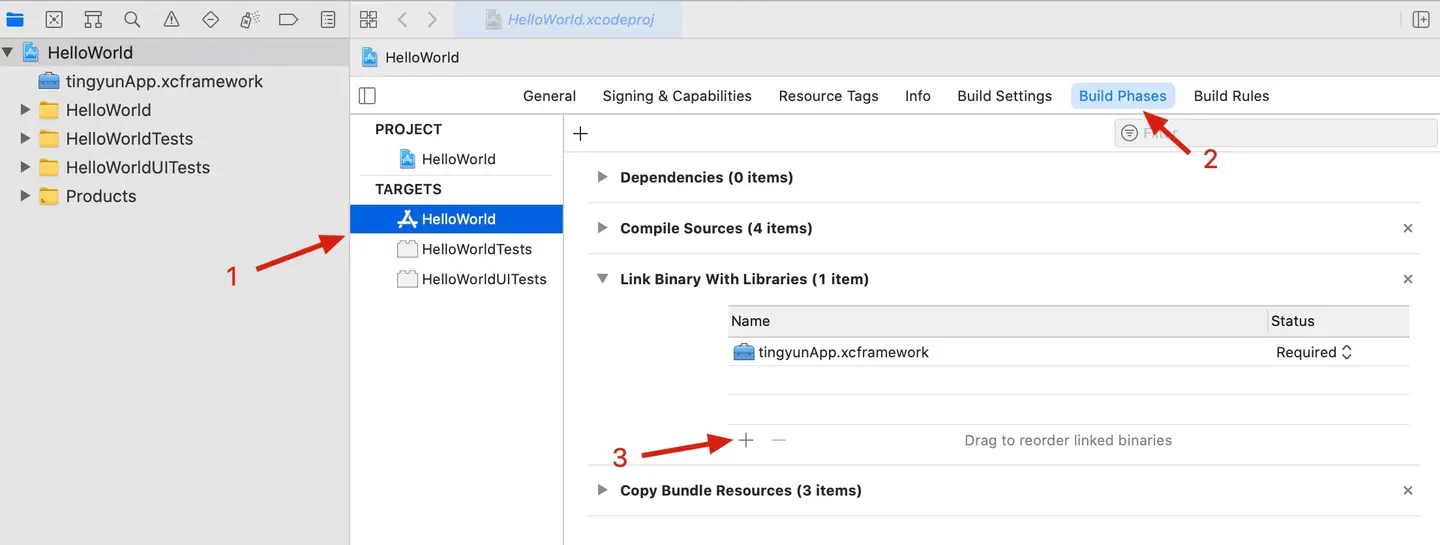
Add dependency libraries.
| Dependency Library | Purpose |
|---|---|
| libz.tbd | Decompression |
| WebKit.framework | Browser engine |
| Security.framework | Access keychain |
| CoreTelephony.framework | Get carrier information |
| SystemConfiguration.framework | Get network status |
| JavaScriptCore.framework | Support JS custom error functionality |
| CoreGraphics.framework | Support visual naming functionality |
| QuartzCore.framework | Support visual naming functionality |
| CFNetwork.framework | Support mobile dialing functionality |
| libresolv.tbd | Support mobile dialing functionality |
| libc++.tbd | C++ symbolization |
SDK Feature Dependency Libraries (Optional)
| Library Name | Functionality |
|---|---|
| NBSGMKit.framework | SDK uses national encryption for data transmission; NBSGMKit.framework is a dynamic library |
| TingyunLog.xcframework | Log retrieval |
| NBSOOM.xcframework | OOM crash collection |
| NBSReplayKit.xcframework | Video replay |
| NBSCPUMonitorKit.xcframework | CPU monitoring |
Add Tingyun SDK
-
Get the Tingyun host and App Key.
App Key and host address should be obtained from the Tingyun platform. Please refer to the following steps for details.
-
Enter application "Settings".

-
Copy App Key and host in "Basic Settings".

-
-
Import header files.
-
Objective-C Please import header files in the project's "pch" file.
#import <tingyunApp/NBSAppAgent.h> -
Swift Please import header files in the project's "Bridging_Header.h" file.
#import <tingyunApp/NBSAppAgent.h>
-
Note: If using "Log Retrieval" functionality, you need to import the log library header file: #import <TingyunLog/TingyunLog.h>
-
Initialize SDK.
-
Objective-C
Initialize the SDK in the "main" method of the project's "main.m" file.
  int main(int argc, char * argv[]) {
      @autoreleasepool {
        //First launch enables network module, user experience module, crash module data collection, only effective on first launch
        [NBSAppAgent setStartOption:NBSOption_Net|NBSOption_UI|NBSOption_Crash];
        	//Default is https, if redirect_host is http protocol, you need to call this interface.
        [NBSAppAgent setHttpEnabled:YES];
        	//redirect_host is the platform server address
        [NBSAppAgent setRedirectURL:@"redirect_host"];
        	//Your_appkey is obtained from the platform
        [NBSAppAgent startWithAppID:@"Your_appkey"];
          return UIApplicationMain(argc, argv, nil, NSStringFromClass([AppDelegate class]));
      }
} -
Swift
Initialize the SDK in the "application(_:didFinishLaunchingWithOptions:)" method of "AppDelegate.swift".
  func application(_ application: UIApplication, didFinishLaunchingWithOptions launchOptions: [UIApplication.LaunchOptionsKey: Any]?) -> Bool {

   NBSAppAgent.setStartOption(Int32(NBSOPTION.NBSOption_Net.rawValue)|Int32(NBSOPTION.NBSOption_UI.rawValue)|Int32(NBSOPTION.NBSOption_Crash.rawValue)) //First launch enables network module, user experience module, crash module data collection, only effective on first launch
   //Default is https, if redirect_host is http protocol, you need to call this interface.
   NBSAppAgent.setHttpEnabled(true)
   NBSAppAgent.setRedirectURL("redirect_host")
   NBSAppAgent.start(withAppID: "Your_appkey")
   return true
}Note: If you need to collect application launch data, please refer to Collect Application Launch Parameters.
-
Permission Configuration
Since the "Mobile Dialing" - "MTR" functionality requires access to Local Network, if "MTR" functionality is configured, you need to configure Local Network permissions in Info.plist.
Get User Identifier
By adding a "User Identifier", you can search for specific users' performance issues in the Tingyun reporting platform using this identifier.
-
Related API
/*
 Set user identifier, cannot exceed 64 characters, can be called multiple times at any location (value override)
 @userId: Information that uniquely identifies a user
 */
+ (void)setUserIdentifier:(NSString *)userId; -
Code Example
- (void)viewDidLoad
{
  [super viewDidLoad];
  //User identifier can be email, phone number, or other information that can identify user identity, such as xxx@tingyun.com
  [NBSAppAgent setUserIdentifier:@"userId"];
}
Instrumentation Integrity Verification
After instrumentation is complete, you can view the Tingyun App SDK log output results in the console to determine if instrumentation is successful.
- Log Output
  NBSAppAgent  SDK_Version
  NBSAppAgent	 start!
  Success to connect to NBSSERVER
Appendix (Optional Configuration)
Enable Visual Naming
Enable visual naming functionality to rename "native pages" and "actions" by clicking within the App and display them in the user experience module.
-
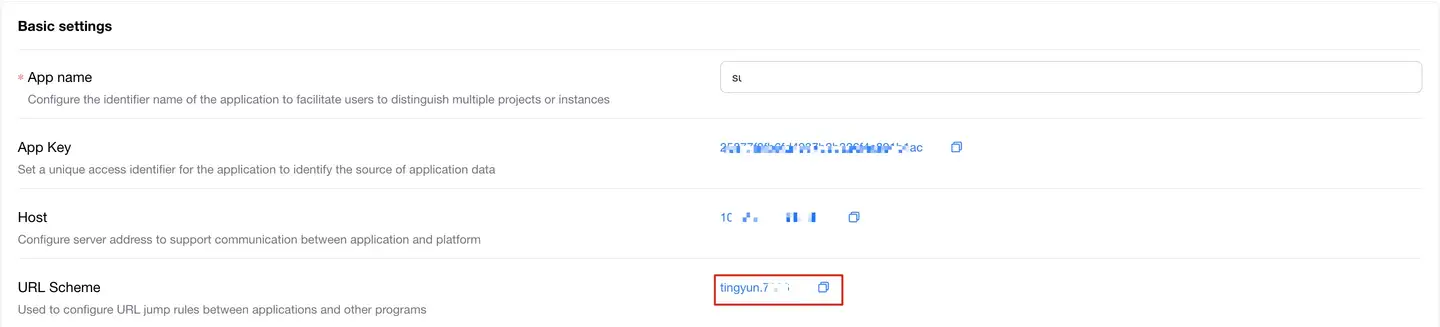
Get Scheme.
-
Select "URL Scheme" in "Basic Settings" in the application "Settings".
-
-
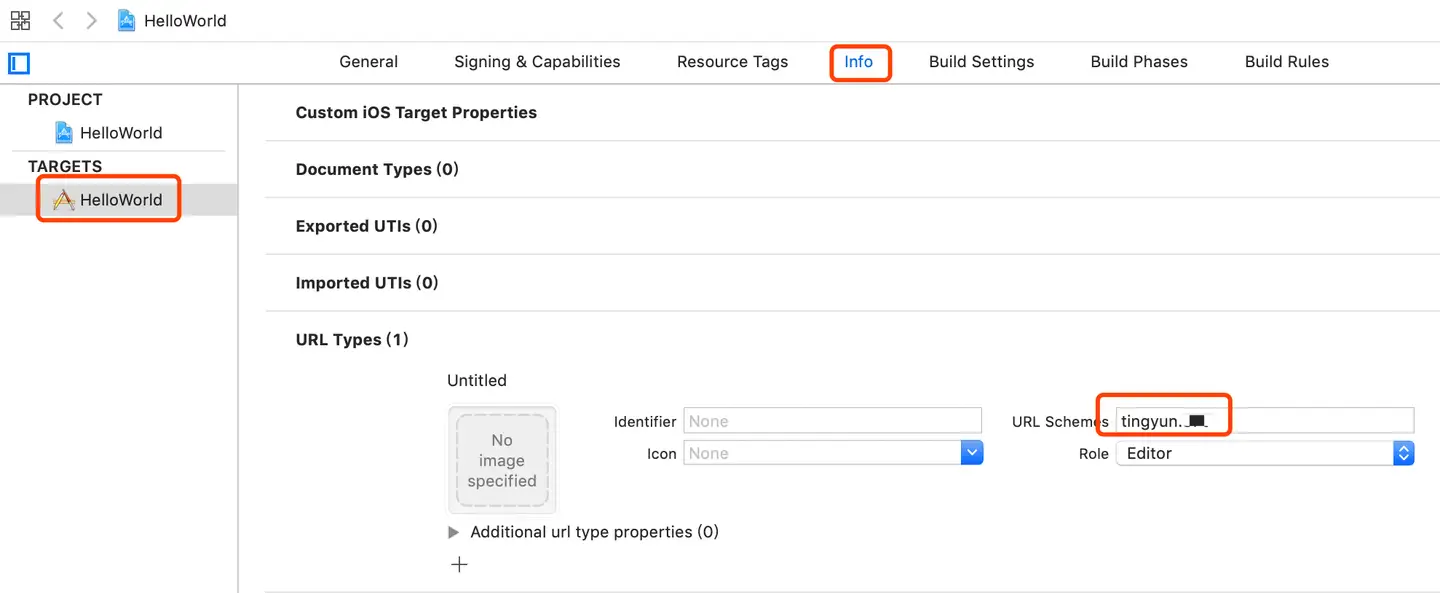
Add the obtained "URL Scheme" to TARGETS → Info → URL Scheme.
SDK Uses National Encryption for Data Transmission
SDK data transmission supports national encryption. Call this interface to enable national encryption. Default is not enabled "Prerequisite: NBSGMKit.framework needs to be imported in the project and backend needs to be set to enable national encryption (please contact technical support to enable backend national encryption)".
Note: This interface needs to be called when initializing the SDK.
-
Related API
/**
 @need Pass yes, then SDK uses national encryption for data transmission.
 */
+ (void)encryptionRequired:(BOOL)need; -
Code Example
int main(int argc, char * argv[]) {
  @autoreleasepool {
  		//Enable national encryption
      [NBSAppAgent encryptionRequired:YES];
    	//Default is https, if redirect_host is http protocol, you need to call this interface.
      [NBSAppAgent setHttpEnabled:YES];
    	//redirect_host is the platform server address
      [NBSAppAgent setRedirectURL:@"redirect_host"];
    	//Your_appkey is obtained from the platform
      [NBSAppAgent startWithAppID:@"Your_appkey"];
      return UIApplicationMain(argc, argv, nil, NSStringFromClass([AppDelegate class]));
  }
}