Probe Deployment
Deployment Guide
Probe deployment can be done in two ways: manual instrumentation and automatic instrumentation.
Manual Instrumentation
Manual instrumentation is when developers manually add browser probes (JS code) to pages, or operations inject probes into pages through Nginx, Apache to collect page performance data.
Advantages:
- Can customize which applications and pages to monitor.
- Many-to-many frontend and backend application Ajax and transaction correlation, cross-application tracking.
- Browser probes can be placed on CDN for acceleration, improving probe download speed.
Automatic Instrumentation
Automatic instrumentation uses system applications to automatically inject browser probes (JS code) into the system application's Web pages, and automatically generates corresponding Web applications for system applications in the Tingyun Web application list. When application pages are accessed, browser probes will transmit collected performance data to the data center for processing. Select the corresponding application in the Tingyun Web application list to perform data analysis on that application.
Advantages
- Simple operation, no need to manually change program code.
- One-to-one frontend and backend Ajax and transaction correlation. Ajax requests can be correlated and tracked to system application corresponding transactions and slow transactions, locating frontend and backend correlation issues, while main HTML pages can be tracked to server transactions.
Notes
- Frontend and backend separated applications (such as: React, Angular, Vue and other frontend frameworks) do not support automatic instrumentation, can use manual instrumentation method, also supports full-stack traceability functionality.
Deployment Process
Manual Instrumentation
-
Select Web > Overview in the left navigation bar to enter the application list page. Click the Add Application button in the upper right corner of the page.
-
Create application name, names cannot be duplicated.
-
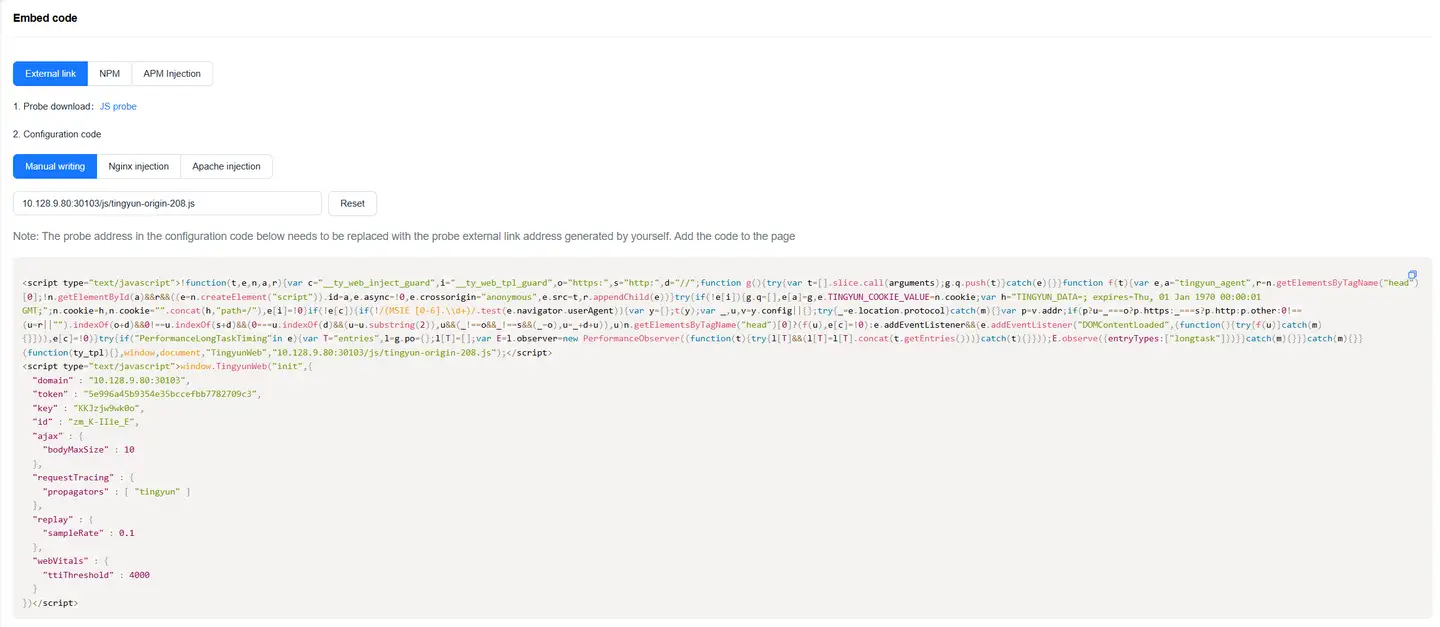
Get probe.
Click enable, choose to download probe or get JS external link.
-
Deploy probe.
Deploy the JS file tingyun-rum.js in an accessible environment, such as Nginx, Apache static resource document directory or deploy through CDN. The probe address referenced in subsequent instrumentation should also be changed to this address.
If using "JS external link" method to use probe, directly use the generated JS external link address.
-
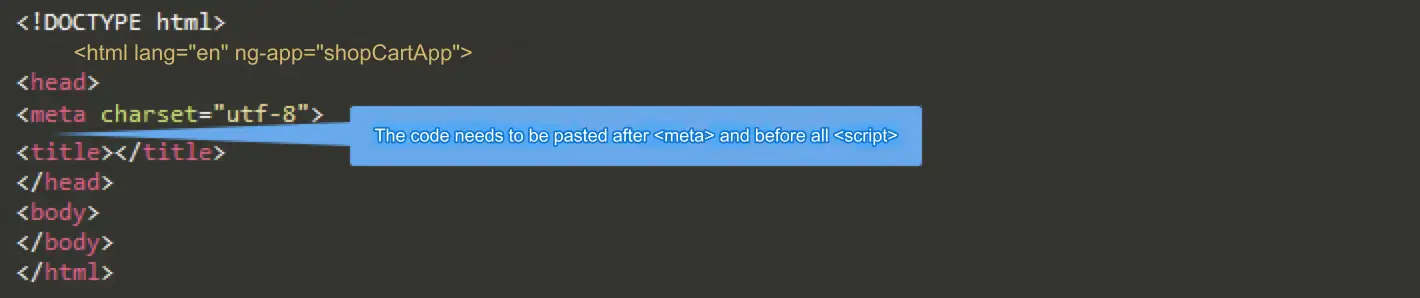
Deploy probe location.
Introduce the probe in the head of pages or applications that need monitoring as shown in the figure below.
-
View reports.
After successful instrumentation deployment to production environment, wait 5 minutes, and you can see the corresponding Web application in the Tingyun Web console application list.
Additional Notes: Probe Injection Methods.
There are three ways to inject probes, any one will work.
-
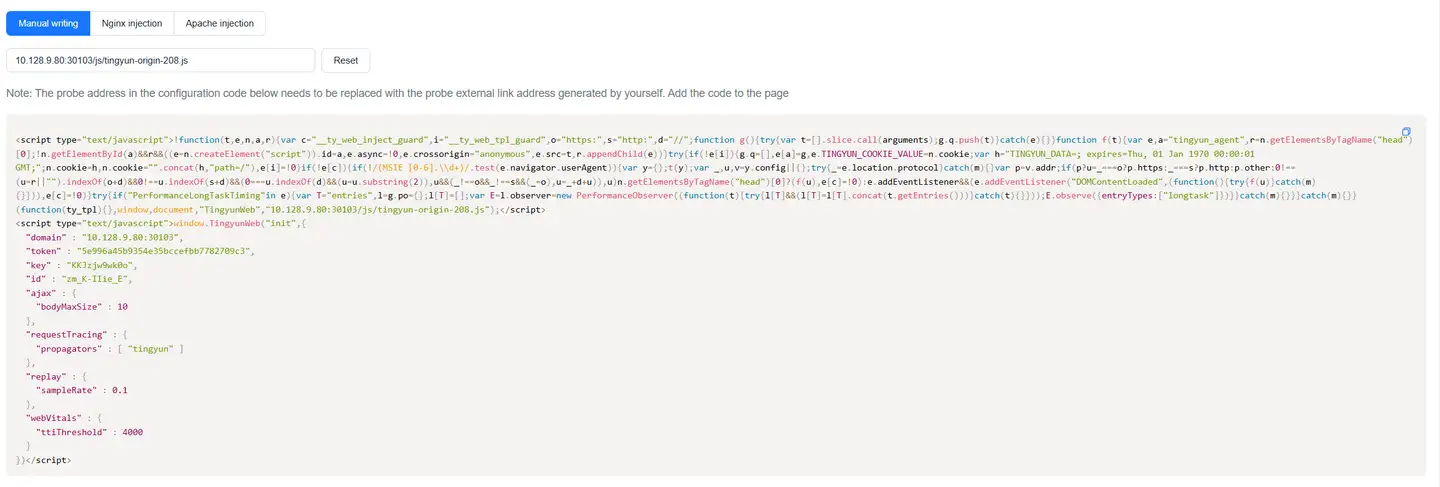
Manual Writing
Copy the code segment and directly add it to the corresponding location.
-
Nginx
Use ngx_http_sub_module for replacement. Please refer to the official documentation for ngx_http_sub_module installation and configuration documentation.
Example as follows:
location / {
sub_filter  '</head>' '<script type="text/javascript">!function(t,e,n,a,r){var c="__ty_web_inject_guard",i="__ty_web_tpl_guard",o="https:",s="http:",d="//";function g(){try{var t=[].slice.call(arguments);g.q.push(t)}catch(e){}}function f(t){var e,a="tingyun_agent",r=n.getElementsByTagName("head")[0];!n.getElementById(a)&&r&&((e=n.createElement("script")).id=a,e.async=!0,e.crossorigin="anonymous",e.src=t,r.appendChild(e))}try{if(!e[i]){g.q=[],e[a]=g,e.TINGYUN_COOKIE_VALUE=n.cookie;var h="TINGYUN_DATA=; expires=Thu, 01 Jan 1970 00:00:01 GMT;";n.cookie=h,n.cookie="".concat(h,"path=/"),e[i]=!0}if(!e[c]){if(!/(MSIE [0-6].\\d+)/.test(e.navigator.userAgent)){var y={};t(y);var _,u,v=y.config||{};try{_=e.location.protocol}catch(m){}var p=v.addr;if(p?u=_===o?p.https:_===s?p.http:p.other:0!==(u=r||"").indexOf(o+d)&&0!==u.indexOf(s+d)&&(0===u.indexOf(d)&&(u=u.substring(2)),u&&(_!==o&&_!==s&&(_=o),u=_+d+u)),u)n.getElementsByTagName("head")[0]?(f(u),e[c]=!0):e.addEventListener&&(e.addEventListener("DOMContentLoaded",(function(){try{f(u)}catch(m){}})),e[c]=!0)}try{if("PerformanceLongTaskTiming"in e){var T="entries",l=g.po={};l[T]=[];var E=l.observer=new PerformanceObserver((function(t){try{l[T]&&(l[T]=l[T].concat(t.getEntries()))}catch(t){}}));E.observe({entryTypes:["longtask"]})}}catch(m){}}}catch(m){}}(function(ty_tpl){},window,document,"TingyunWeb","10.128.9.80:30103/js/tingyun-origin-208.js");</script>
<script type="text/javascript">window.TingyunWeb("init",{"domain" : "10.128.9.80:30103","token" : "5e996a45b9354e35bccefbb7782709c3","key" : "KKJzjw9wk0o","id" : "zm_K-IIie_E","ajax" : {"bodyMaxSize" : 10},"requestTracing":{"propagators" : [ "tingyun" ]},"replay" : {"sampleRate" : 0.1},"webVitals" : {"ttiThreshold" : 4000}})</script></head>';
sub_filter_once on;
} -
Apache
Using Apache as Web container for content replacement requires mod_substitute and mod_filter modules. Apache requires version 2.4 and above. Example using Apache 2.4:
<Location />
AddOutputFilterByType SUBSTITUTE text/html
Substitute 's%</head>%<script type="text/javascript">!function(t,e,n,a,r){var c="__ty_web_inject_guard",i="__ty_web_tpl_guard",o="https:",s="http:",d="//";function g(){try{var t=[].slice.call(arguments);g.q.push(t)}catch(e){}}function f(t){var e,a="tingyun_agent",r=n.getElementsByTagName("head")[0];!n.getElementById(a)&&r&&((e=n.createElement("script")).id=a,e.async=!0,e.crossorigin="anonymous",e.src=t,r.appendChild(e))}try{if(!e[i]){g.q=[],e[a]=g,e.TINGYUN_COOKIE_VALUE=n.cookie;var h="TINGYUN_DATA=; expires=Thu, 01 Jan 1970 00:00:01 GMT;";n.cookie=h,n.cookie="".concat(h,"path=/"),e[i]=!0}if(!e[c]){if(!/(MSIE [0-6].\\d+)/.test(e.navigator.userAgent)){var y={};t(y);var _,u,v=y.config||{};try{_=e.location.protocol}catch(m){}var p=v.addr;if(p?u=_===o?p.https:_===s?p.http:p.other:0!==(u=r||"").indexOf(o+d)&&0!==u.indexOf(s+d)&&(0===u.indexOf(d)&&(u=u.substring(2)),u&&(_!==o&&_!==s&&(_=o),u=_+d+u)),u)n.getElementsByTagName("head")[0]?(f(u),e[c]=!0):e.addEventListener&&(e.addEventListener("DOMContentLoaded",(function(){try{f(u)}catch(m){}})),e[c]=!0)}try{if("PerformanceLongTaskTiming"in e){var T="entries",l=g.po={};l[T]=[];var E=l.observer=new PerformanceObserver((function(t){try{l[T]&&(l[T]=l[T].concat(t.getEntries()))}catch(t){}}));E.observe({entryTypes:["longtask"]})}}catch(m){}}}catch(m){}}(function(ty_tpl){},window,document,"TingyunWeb","10.128.9.80:30103/js/tingyun-origin-208.js");</script>
<script type="text/javascript">window.TingyunWeb("init",{"domain" : "10.128.9.80:30103","token" : "5e996a45b9354e35bccefbb7782709c3","key" : "KKJzjw9wk0o","id" : "zm_K-IIie_E","ajax" : {"bodyMaxSize" : 10},"requestTracing":{"propagators" : [ "tingyun" ]},"replay" : {"sampleRate" : 0.1},"webVitals" : {"ttiThreshold" : 4000}})</script></head>%in'
</Location>
Note:
- If your HTML uses
<meta>tags to specify encoding, the<meta>tag should be placed immediately after the<head>tag, and the browser probe should be placed immediately after the last<meta>tag. - Please do not directly use the address in the document js.src, please copy the code and address after creating the application. If using CDN or relative paths, please change the address accordingly.
- If your HTML uses
Automatic Instrumentation
Select Server application, inject browser probe, click enable.

Currently supports Java and .NET languages.
Verify Probe Deployment Success
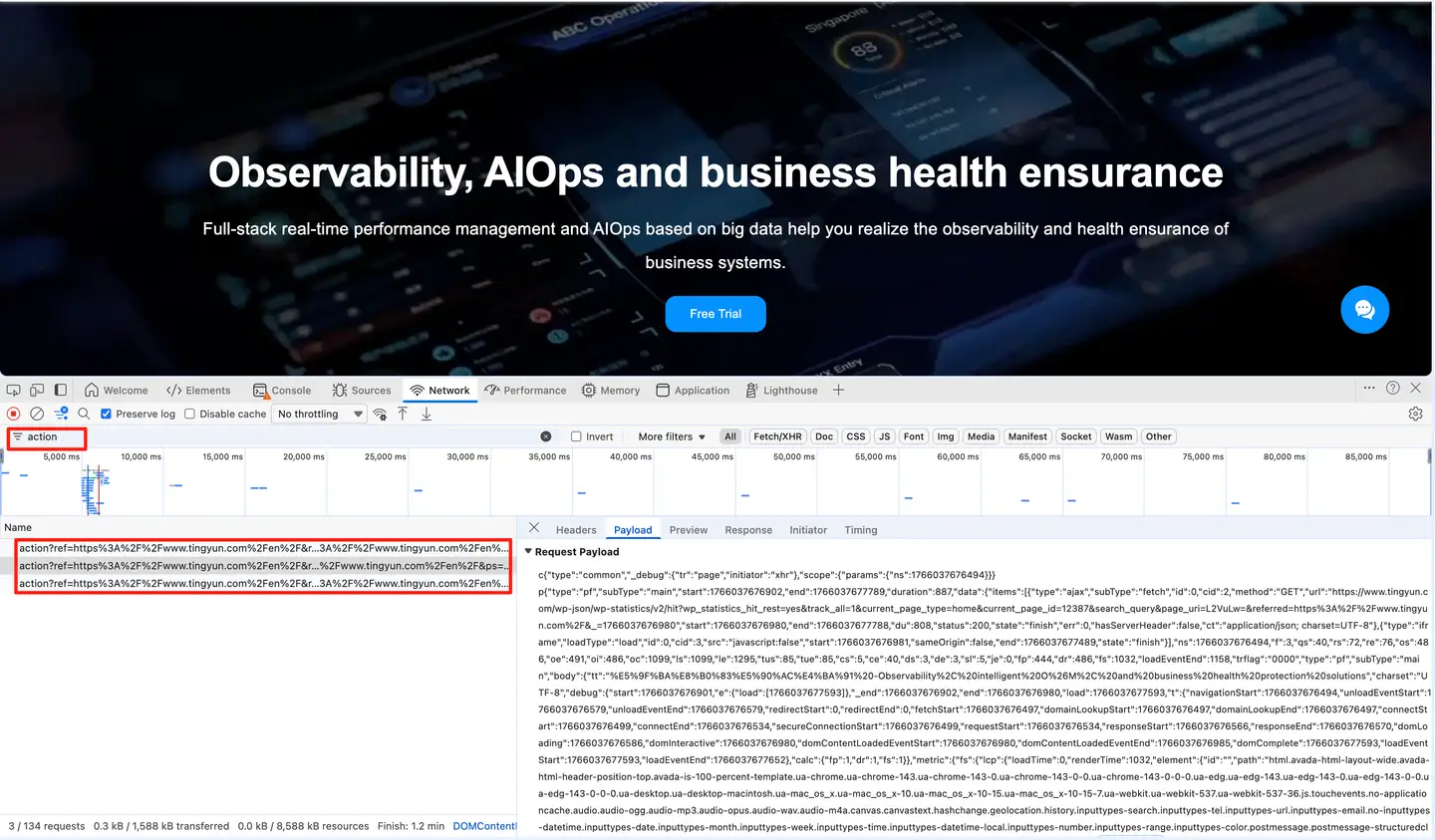
Access the instrumented page through Chrome browser, press F12, then search for "action" in network. If there is action interface data, it means instrumentation is successful.
The action interface uploads performance data after successful instrumentation.