Configuring Cross-Application and Cross-Origin
Cross-Application Method
Tingyun Web and Tingyun APM support cross-application in two ways:
- For pages, the server writes a special Cookie value in the response header via
Set-Cookie, carrying server-side performance data and other information. The Web agent retrieves and deletes the corresponding Cookie after obtaining it, then includes the server-side information when uploading Web data. - For Ajax requests, the Web agent adds a specified request header
X-Tingyunto the request. The server responds with a specified response headerX-Tingyun-Data. The Web agent obtains the relevant server performance data throughX-Tingyun-Data.
This document mainly describes the configuration of the second scenario in actual deployment.
Determining Cross-Origin
The Web agent adds the X-Tingyun header to Ajax requests only when the following conditions are met:
- Ajax cross-application switch is enabled.
- Ajax request and page address are same-origin.
- Ajax request and page address are different origins, but the request domain is configured in the cross-origin domain settings.
Same-origin means the protocol, domain name, and port number of the page address and Ajax request address must be exactly the same. When the Ajax request address differs from the page address, it is a cross-origin request.
Example 1: Different protocols are not same-origin
Page: http://tingyun.com/index.html
Ajax: https://tingyun.com/api/getUser
The Ajax address uses the https protocol, which is different from the page's http, so it is not same-origin.
Example 2: Same parent domain, different subdomains, not same-origin
Page: http://doc.tingyun.com/index.html
Ajax: http://api.tingyun.com/getUser
The Ajax domain is api.tingyun.com, which is different from the page's doc.tingyun.com, so it is not same-origin.
Example 3: Different ports are not same-origin
Page: http://10.128.1.32:8080/index.html
Ajax: http://10.128.1.32:9090/api/getUser
The page port is 8080, Ajax port is 9090, so it is not same-origin.
Browsers restrict cross-origin requests made in scripts (JS) for security reasons. For scenarios where the Web agent adds custom request headers (X-Tingyun) and retrieves custom response headers (X-Tingyun-Data), there are restrictions:
- Adding custom request headers in cross-origin scenarios triggers a preflight (OPTIONS) request. The server must return the relevant headers to allow custom request headers.
- Custom response headers (
X-Tingyun-Data) cannot be directly accessed by client scripts in cross-origin scenarios. The server must return the relevant headers to allow access to custom response headers.
If the server is not configured correctly, directly adding request headers can seriously affect business operations. After configuring cross-origin domains in the report, the Web agent will add the X-Tingyun request header to cross-origin Ajax requests that match the rules. If the server is not configured correctly, there will be serious consequences. Therefore, before enabling cross-origin domain configuration, you must ensure that the server configuration is effective.
Cross-Origin Ajax Cross-Application Configuration Flowchart

The following describes the detailed steps for configuring cross-origin Ajax cross-application. You must operate in order and ensure each step is completed before proceeding to the next.
Step 1: Configuring Nginx
Using Nginx as an example, the following configuration is for the server to add the required response headers and related handling. It is recommended to embed the code at the server level of the user's backend API Nginx. If precise configuration is needed, you can also configure it under the corresponding location.
Nginx configuration example:
server {
    listen 5999;
    server_name localhost;

    # Start configuration
    add_header 'Access-Control-Allow-Origin' '$http_origin';
    add_header 'Access-Control-Allow-Headers' 'X-Tingyun';
    add_header 'Access-Control-Expose-Headers' 'X-Tingyun-Data';
    add_header 'Access-Control-Allow-Methods' 'GET, HEAD, POST, PUT, DELETE, OPTIONS';
    add_header 'Access-Control-Max-Age' 1728000;
    if ($request_method = 'OPTIONS') {
        return 204;
    }
    # End configuration

    location /server/ {
        proxy_pass http://localhost:8089/;
    }
}
Configuration notes:
- Access-Control-Allow-Origin
Required, but must be set according to actual conditions. The value should be the request's domain. This is a single value. If the user's environment has already added it, do not add it again. - Access-Control-Allow-Headers
Required. Must includeX-Tingyun. - Access-Control-Expose-Headers
Required. Must include
X-Tingyun-Data. - Access-Control-Allow-Methods
Required, but set according to actual conditions. If already added in the client environment, do not add again (adding it multiple times will not cause errors). - Access-Control-Max-Age
Optional. The browser can cache the OPTIONS request according to this header.
Other notes:
Access-Control series headers support wildcards, but when the client sends credentialed requests (e.g., XHR: xhr.withCredentials = true;), wildcards are invalid. To simplify troubleshooting, you need to specify X-Tingyun and X-Tingyun-Data precisely and avoid using wildcards.
Access-Control-Allow-Headers Reference
Access-Control-Expose-Headers Reference
Step 2: Verifying Server Configuration
Note: Do not proceed to Step 3 if this step fails!
Use the curl command to access the user's Ajax request, specify the request method as OPTIONS, and include the request header X-Tingyun used by the Web agent:
curl -I -H 'X-Tingyun: c=B|key;x=random' -X OPTIONS [URL]
Example:
[tingyun@apm3-saas-alpha-001 ~]$ curl -I -H 'X-Tingyun: c=B|key;x=random' -X OPTIONS http://192.168.5.149:5999/server/server-test
HTTP/1.1 204 No Content
Server: nginx/1.19.4
Date: Tue, 24 Nov 2020 07:22:49 GMT
Connection: keep-alive
Access-Control-Allow-Headers: X-Tingyun
Access-Control-Expose-Headers: X-Tingyun-Data
Access-Control-Allow-Methods: GET, HEAD, POST, PUT, DELETE, OPTIONS
Access-Control-Max-Age: 1728000
Judging configuration success:
- Confirm that the Nginx configuration is effective in the returned result. Confirm that
Access-Control-Allow-HeadersincludesX-TingyunandAccess-Control-Expose-HeadersincludesX-Tingyun-Data. - Related response header configuration items must not be duplicated.
Step 3: Configuring Cross-Origin Domains
- In the left navigation bar, click Overview, then click Settings for the target application to enter the application settings page. Click APM Settings > Add Cross-Origin Domain in sequence. After adding, save the settings.
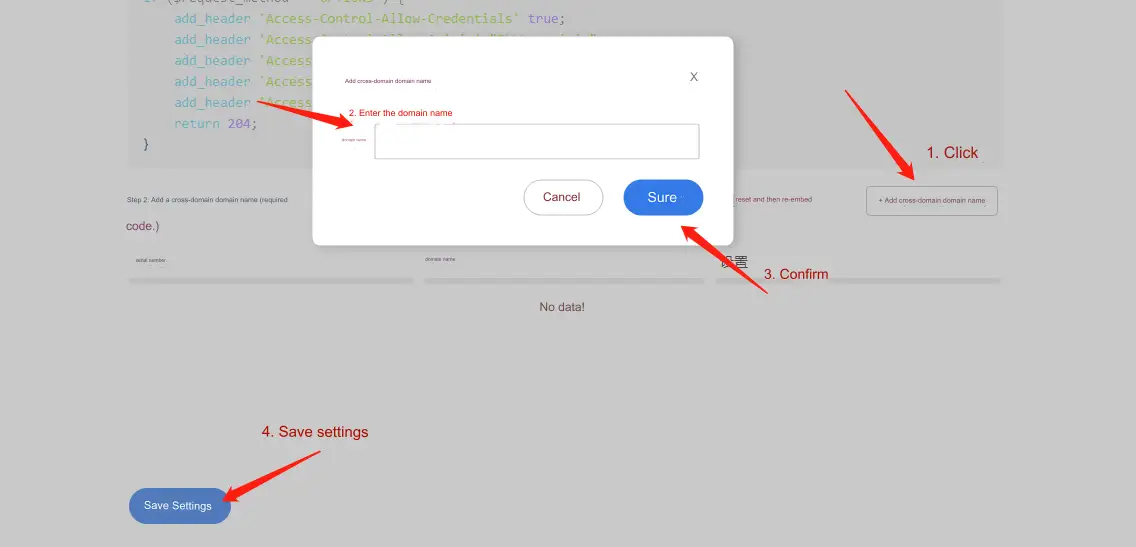 For example, if the Ajax request address is
 https://api.tingyun.com/getUser, you need to configure the domainapi.tingyun.com. The configuration supports inclusion, meaning that if the Ajax request domain contains the configured domain, it will also take effect. In the above case, configuringtingyun.comwill also be effective. - If you manually embed the agent by downloading it, you need to re-download and embed the agent. If you use an external link, the configuration will take effect immediately.
- Verify whether the agent content has been issued with the cross-origin domain configuration.
Download the agent file or access the agent external link, search for cors_domains, and find the last matching item. Check whether the array contains the previously configured cross-origin domain.
Step 4: Verifying Cross-Application Effectiveness
Open the user system, use Chrome Developer Tools or a packet capture tool to check whether the previous cross-origin Ajax requests meet the following:
- The request header contains
X-Tingyun, and the response header containsX-Tingyun-Data.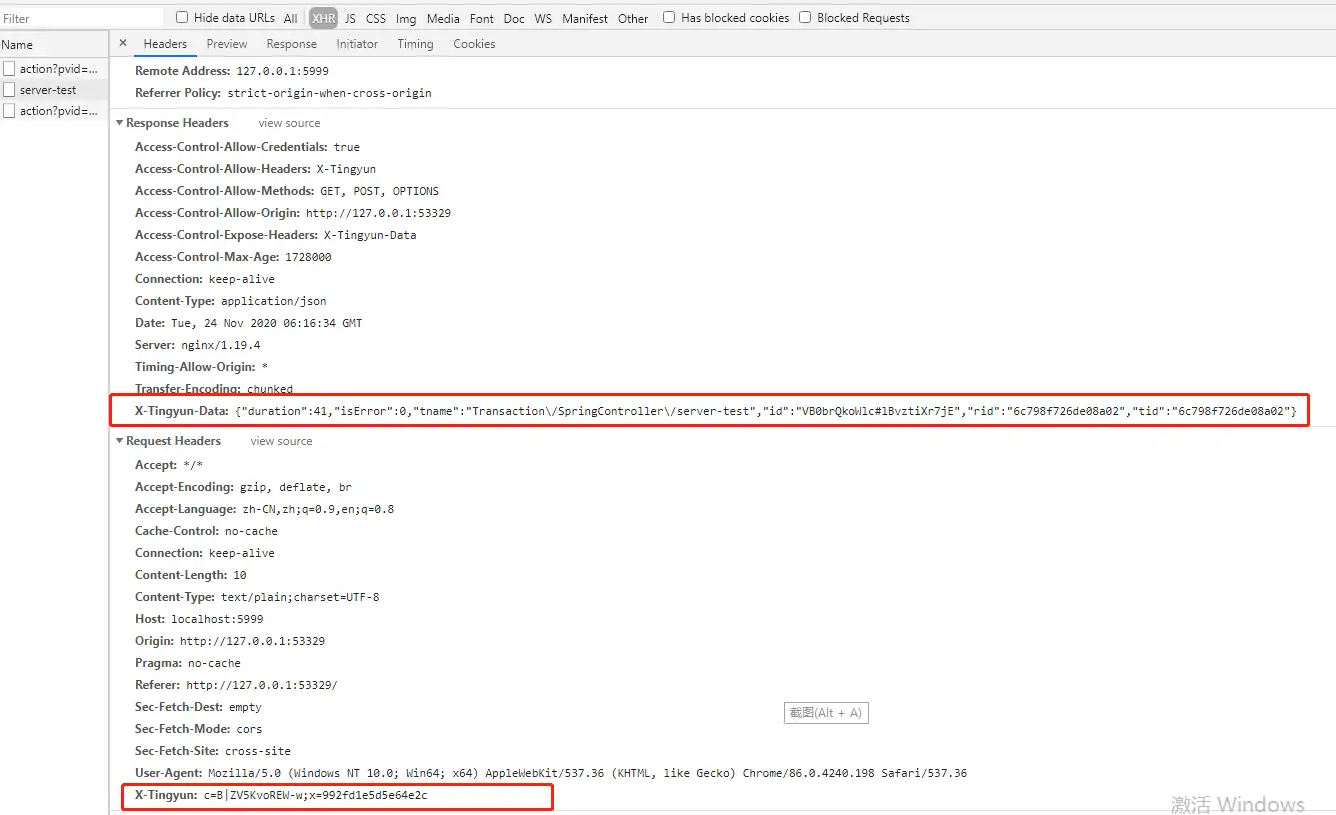
- There are no errors in the developer console about obtaining
X-Tingyun-Data, i.e., the following error does not appear.
If normal, the agent can now capture cross-application data.
Troubleshooting Common Issues
- If the
X-Tingyunrequest header is not included, check the agent content currently referenced by the client. Follow Step 3, item 3 to check whether the cross-origin configuration has been successfully issued. Some clients may need to clear the browser cache. - If the cross-origin Ajax request includes the
X-Tingyunrequest header but not theX-Tingyun-Dataresponse header, check whether the request header has been received by the server agent or whether the server agent is issuing the response header correctly.