When there are applications in multiple languages on the server, it is recommended to use the UniAgent installation. The UniAgent package integrates Agents for Java, PHP, .NET Core, and more. After installation, you do not need to manually modify the application's configuration files. All Agent embedding actions are automatically completed by UniAgent, and it can automatically monitor applications inside Docker containers.
The installation path is fixed at /opt/tingyun-oneagent. UniAgent installation steps are as follows:
-
Download the UniAgent package and run the installation script.
sudo ./tingyun-agent-oneagent-<version>.sh -
Restart the PHP host service (apache or php-fpm).
sudo service httpd startor
sudo service php-fpm start
To install the Agent to a specified directory, you must use the bin package for installation.
Parameters:
--license Specify license, required
--collectors Specify collector address, required
--prefix Specify installation path, default is /opt
--appname Specify application name, default is PHP Application, supports obtaining from environment variable, e.g. \${CUSTOM_ENV_NAME}
--skipcheck Skip checking collector connectivity, set to true when building docker images
Example:
sudo ./tingyun-agent-php-<version>.x86_64.bin --license=<your license> --collectors=<address:port> \
     --appname=<application name> --skipcheck=true
Installation Steps:
-
Run the bin package for installation. By default, it installs to /opt/.
sudo ./tingyun-agent-php-<version>.x86_64.bin --license=<your license> --collectors=<address:port>The installation script will try to automatically find the PHP path and modify php.ini to add tingyun.so to php.ini.
If you need to install the bin package to a specified location, use the --prefix parameter.
sudo ./tingyun-agent-php-<version>.x86_64.bin --prefix=/path/to -
Restart the PHP host service (apache or php-fpm).
sudo service httpd startor
sudo service php-fpm start
docker Image Build:
-
Copy the installation package to the directory where the Dockerfile is located.
-
Modify the Dockerfile. The following is an example, please modify as needed.
FROM php:7.1-fpm

# web application

RUN cp /usr/local/etc/php/php.ini-production /usr/local/etc/php/php.ini

RUN echo "<?php phpinfo(); ?>" > /var/www/html/info.php

# install tingyun agent

COPY tingyun-agent-php-3.2.0.0.x86_64.bin .
RUN sh ./tingyun-agent-php-3.2.0.0.x86_64.bin \
    --license="B9wJmHhxdcGRIZNR" --collectors="192.168.5.50:7665" --appname="\${CUSTOM_ENV_NAME}" --skipcheck=true
RUN rm -rf ./tingyun-agent-php-3.2.0.0.x86_64.bin

# run web application

ENTRYPOINT ["php-fpm"]
When the PHP path cannot be found in the standard location or some PHP information is missing, automatic installation of the PHP extension fails. In this case, manual installation is required.
-
Create a phpinfo() script.
echo "<?php phpinfo(); ?>" > /path/to/info.php -
Use a browser to access info.php.
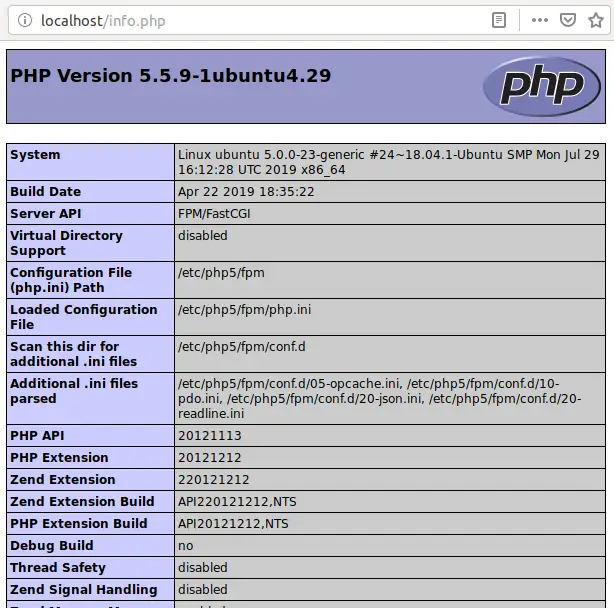
-
Run the installation script.
sudo /opt/tingyun-php/scripts/install-by-web.sh

Looking for phpinfo() in web ...

Please input phpinfo url:
Enter the URL corresponding to info.php.
The installation script will try to use phpinfo information to find the PHP path and modify php.ini to add tingyun.so to php.ini.
-
Restart the Web container.