Custom Instrumentation
When automatic instrumentation does not meet your requirements, you can use the Go SDK API for custom instrumentation.
To facilitate tracing program issues, we divide the application execution process into two concepts: Transaction and Component.
- Transaction is the process of handling a service request, such as a web request or the server-side processing of an RPC call.
- Component is the process of handling each sub-function within a transaction, such as external RPC calls, database calls, NoSQL calls, message queue producer/consumer requests, function/logic algorithm calculations, or module encapsulation.
SDK API
| API Function Declaration | Description |
|---|---|
| CreateAction func CreateAction(name string, method string) (*Action, error) | Create a transaction object. For net/http-based applications, use GetAction |
| GetAction func GetAction() *Action | Get the current transaction object on the coroutine (for net/http applications, the Agent will automatically create a transaction object; use this function to obtain it) |
| (*Action).CreateExternalComponent func (*Action) CreateExternalComponent(url string, method string) *Component | Create an external service call component |
| (*Action).CreateMQComponent func (*Action) CreateMQComponent(vender string, isConsumer bool, host, queue string) *Component | Create a message queue component |
| (*Action).CreateMongoComponent func (*Action) CreateMongoComponent(host, database, collection, op, method string) *Component | Create a MongoDB component |
| (*Action).CreateComponent func (*Action) CreateComponent(method string) *Component | Create a custom process monitoring component |
| (*Action).AddRequestParam func (*Action) AddRequestParam(k string, v string) | Add transaction request parameter |
| (*Action).AddResponseParam func (*Action) AddResponseParam(k string, v string) | Add transaction response parameter |
| (*Action).AddCustomParam func (*Action) AddCustomParam(k string, v string) | Add custom transaction parameter |
| (*Action).GetTxData func (*Action) GetTxData() string | For cross-application tracing (callee side), get transaction data |
| (*Action).SetTrackID func (*Action) SetTrackID(id string) | For cross-application tracing (callee side), pass cross-application trace ID |
| (*Action).SetName func (*Action) SetName(name string, method string) | Set transaction name, same parameters as CreateAction |
| (*Action).SetHTTPMethod func (*Action) SetHTTPMethod(httpMethod string) | Set HTTP request method type (GET/POST/PUT/OPTIONS/HEAD) |
| (*Action).SetURL func (*Action) SetURL(name string) | Set the URI of the transaction |
| (*Action).Ignore func (*Action) Ignore() | Ignore data collection for this transaction |
| (*Action).SetError func (*Action) SetError(e interface) | Collect transaction error information |
| (*Action).Finish func (*Action) Finish() | End transaction collection |
| (*Action).SetStatusCode func (*Action) SetStatusCode(code uint16) int | Collect transaction status code |
| (*Component).GetAction func (*Component) GetAction() *Action | Get the transaction object corresponding to the component |
| (*Component).SetError func (*Component) SetError(e interface, errType string, skipStack int) | Collect error information |
| (*Component).Finish func (*Component) Finish() | End component process |
| (*Component).CreateTrackID func (*Component) CreateTrackID() string | Generate cross-application trace ID |
| (*Component).SetTxData func (*Component) SetTxData(txData string) | Receive cross-application trace ID returned by the callee |
| (*Component).CreateComponent func (*Component) CreateComponent(method string) *Component | Create a sub-process for the component (further breakdown) |
CreateAction
/* Function: Create a transaction component
 * Parameters:
 *      name: Corresponding package/struct name
 *      method: Function name
 * Returns:
 *      (pointer to transaction object, error)
 */
func CreateAction(name string, method string) (*Action, error)
GetAction
/* Function: Get the transaction object corresponding to the current coroutine
 * Parameters: None
 * Returns:
 *      pointer to transaction component object
 */
GetAction() *Action
(*Action).CreateExternalComponent
/* Function: Create an external call component
 * Parameters:
 *         url: external service call url
 *         method: external call process identifier
 * Returns:
 *      pointer to external call component
 */
func (*Action) CreateExternalComponent(url string, method string) *Component
(*Action).CreateMQComponent
/*
 * Function: Create a message queue component
 * Parameters:
 *     vender: message queue type (rabbitMQ/Kafka/ActiveMQ)
 *     isConsumer: whether it is a consumer component
 *     host: MQ address
 *     queue: message queue name
 * Returns:
 *     pointer to message queue component
 */
func (*Action) CreateMQComponent(vender string, isConsumer bool, host, queue string) *Component
(*Action).CreateMongoComponent
/*
 * Function:  Create a MongoDB component
 * Parameters:
 *       host: server address
 *       database: database name
 *       collection: collection name
 *       op: mongo operation
 *       method: component process identifier
 * Returns:
 *       pointer to MongoDB component
 */
func (*Action) CreateMongoComponent(host, database, collection, op, method string) *Component
(*Action).CreateComponent
/*
 * Function: Create a custom application process
 * Parameters:
 *        method: component process identifier
 * Returns:
 *       pointer to custom component
 */
func (*Action) CreateComponent(method string) *Component
(*Action).AddRequestParam
/*
 * Function: Collect transaction request parameter
 * Parameters:
 *        k: parameter name
 *        v: parameter value
 * Returns: None
 */
func (*Action) AddRequestParam(k string, v string)
(*Action).AddResponseParam
/*
 * Function: Collect transaction response parameter
 * Parameters:
 *        k: parameter name
 *        v: parameter value
 * Returns: None
 */
func (*Action) AddResponseParam(k string, v string)
(*Action).AddCustomParam
/*
 * Function: Collect custom parameter
 * Parameters:
 *        k: parameter name
 *        v: parameter value
 * Returns: None
 */
func (*Action) AddCustomParam(k string, v string)
(*Action).GetTxData
/*
 * Function: Get transaction performance data (cross-application tracing: callee execution)
 * Parameters: None
 * Returns:
 *         transaction performance data
 */
func (*Action) GetTxData() string
(*Action).SetTrackID
/*
 * Function: Write cross-application trace data (cross-application tracing: callee execution)
 * Parameters:
 *        id: string generated by the caller's (*Component).CreateTrackID, passed to the callee
 * Returns: None
 */
func (*Action) SetTrackID(id string)
(*Action).SetName
/*
 * Function: Reset transaction name
 * Parameters:
 *      name: more precise package/class (struct) name
 *      method: function name
 * Returns: None
 */
func (*Action) SetName(name string, method string)
(*Action).SetHTTPMethod
/*
 * Function: Collect HTTP request method
 * Parameters:
 *        httpMethod: GET/POST/HEAD/OPTIONS/PUT
 * Returns: None
 */
func (*Action) SetHTTPMethod(httpMethod string)
(*Action).SetURL
/*
 * Function: Collect transaction URI
 * Parameters:
 *          name: request URI
 * Returns: None
 */
func (*Action) SetURL(name string)
(*Action).Ignore
/*
 * Function: Discard transaction performance data for this collection
 * Parameters:  None
 * Returns: None
 */
func (*Action) Ignore()
(*Action).SetError
/*
 * Function: Collect error data, capture call stack
 * Parameters:
 *        e: error object
 * Returns: None
 */
func (*Action) SetError(e interface{})
(*Action).Finish
/*
 * Function: End transaction data collection
 * Parameters:  None
 * Returns: None
 */
func (*Action) Finish()
(*Action).SetStatusCode
/*
 * Function: Collect transaction status code
 * Parameters:
 *      code: transaction response status code
 * Returns:
 *        integer, 0 for success, non-zero for failure
 */
func (*Action) SetStatusCode(code uint16) int
(*Component).GetAction
/*
 * Function: Get the transaction object associated with the component
 * Parameters: None
 * Returns:
 *        transaction object
 */
func (*Component) GetAction() *Action
(*Component).SetError
/*
 * Function: Collect component error
 * Parameters:
 *       e: error object
 *       errorType: error type
 *       skipStack: number of call stacks to skip, usually 0
 * Returns: None
 */
func (*Component) SetError(e interface{}, errType string, skipStack int)
(*Component).Finish
/*
 * Function: End component performance data collection
 * Parameters: None
 * Returns: None
 */
func (*Component) Finish()
(*Component).CreateTrackID
/*
 * Function: Create a cross-application trace ID string (cross-application tracing: caller execution)
 * Parameters: None
 * Returns:
 *        cross-application trace ID information (sent to the callee via the request)
 */
func (*Component) CreateTrackID() string
(*Component).SetTxData
/*
* Function: Write the transaction performance data executed by the callee (cross-application tracing: caller execution). Write the transaction data carried by the RPC call return.
 * Parameters:
 *        txData: data generated by the callee's (*Action).GetTxData
 * Returns: None
 */
func (*Component) SetTxData(txData string)
(*Component).CreateComponent
/*
 * Function: Further subdivide the component into sub-components
 * Parameters:
 *       sub-component method name
 * Returns:
 *       component object
 */
func (*Component) CreateComponent(method string) *Component
Examples
UDP Service
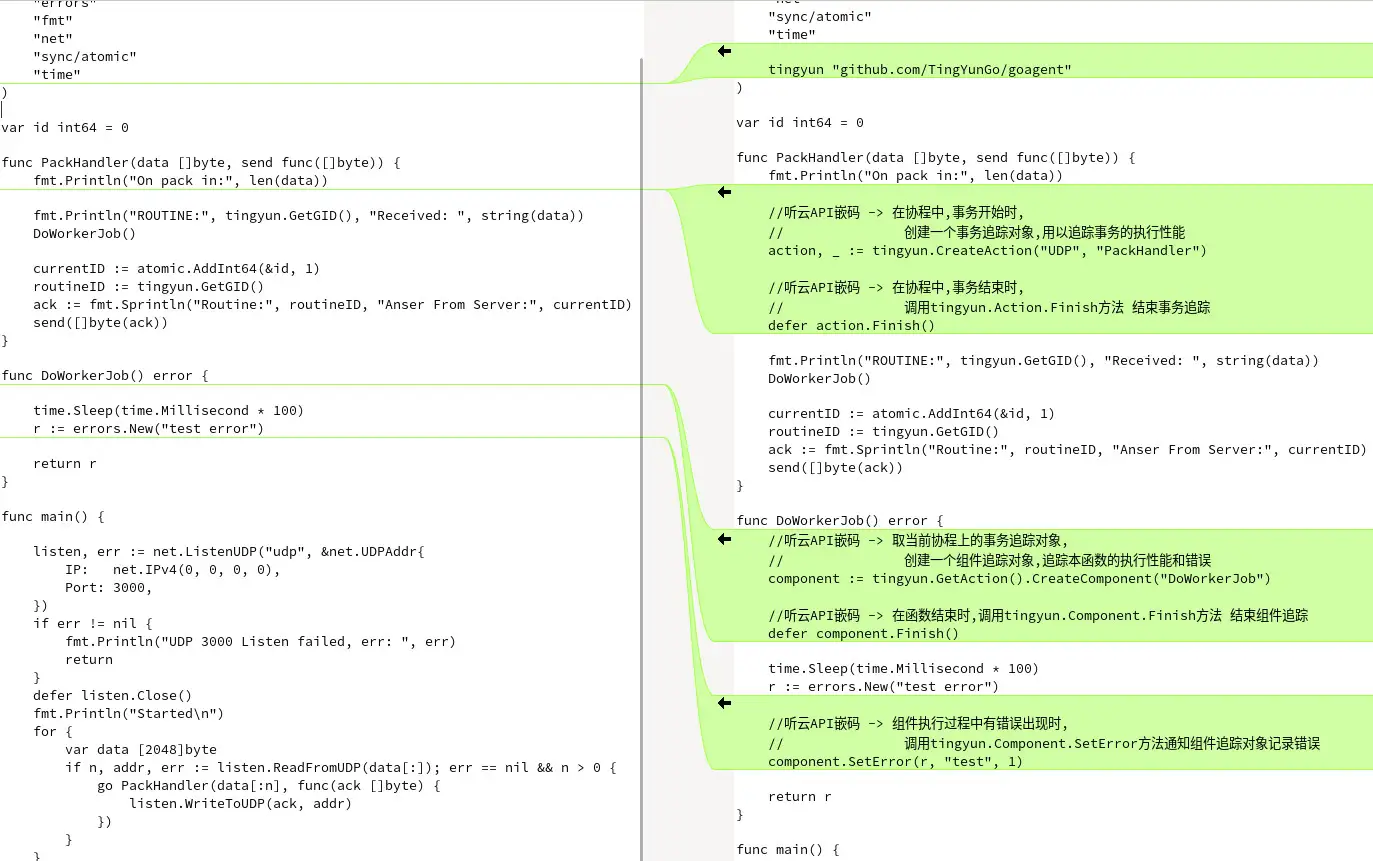
In the following UDP service example code, both the service processing framework and components are custom, so the creation of transaction objects and component objects are all done manually. For the actual application code, see here.
Comparison before and after code instrumentation:
Compiling:
$ go mod tidy
$ go build
Running:
-
Step 1: Configure the tingyun.conf file, set license_key to your actual license key, and set collector.address to your actual Agent Collector address.
-
Step 2: Set environment variables and run.
$ export TINGYUN_GO_APP_CONFIG=tingyun.conf
$ ./api_general &
Testing Access:
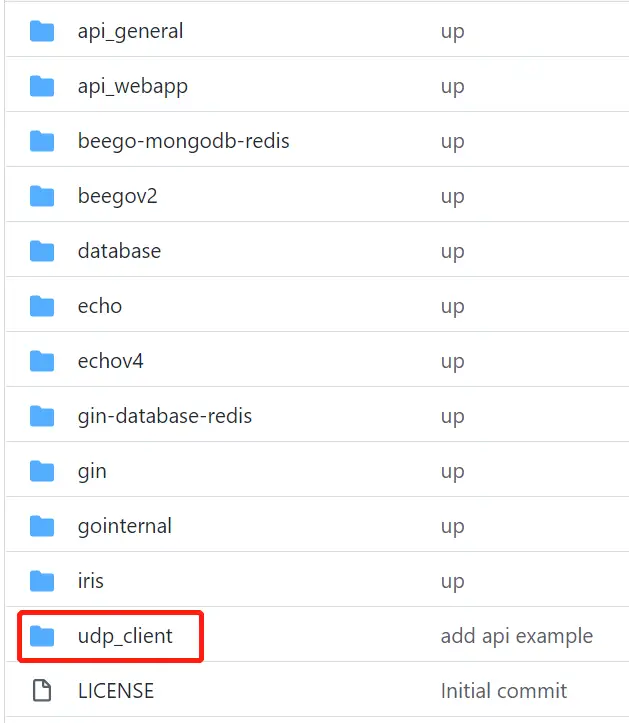
Use the udp_client provided in the same folder to send test data.
$ cd ../udp_client && go build
$ ./udp_client
Viewing Application Performance Data:
If the instrumentation and configuration are correct, after the application starts, log in to the Tingyun Application & Microservices Console, and you will see the data for the api_general application in the application list.
Web Service
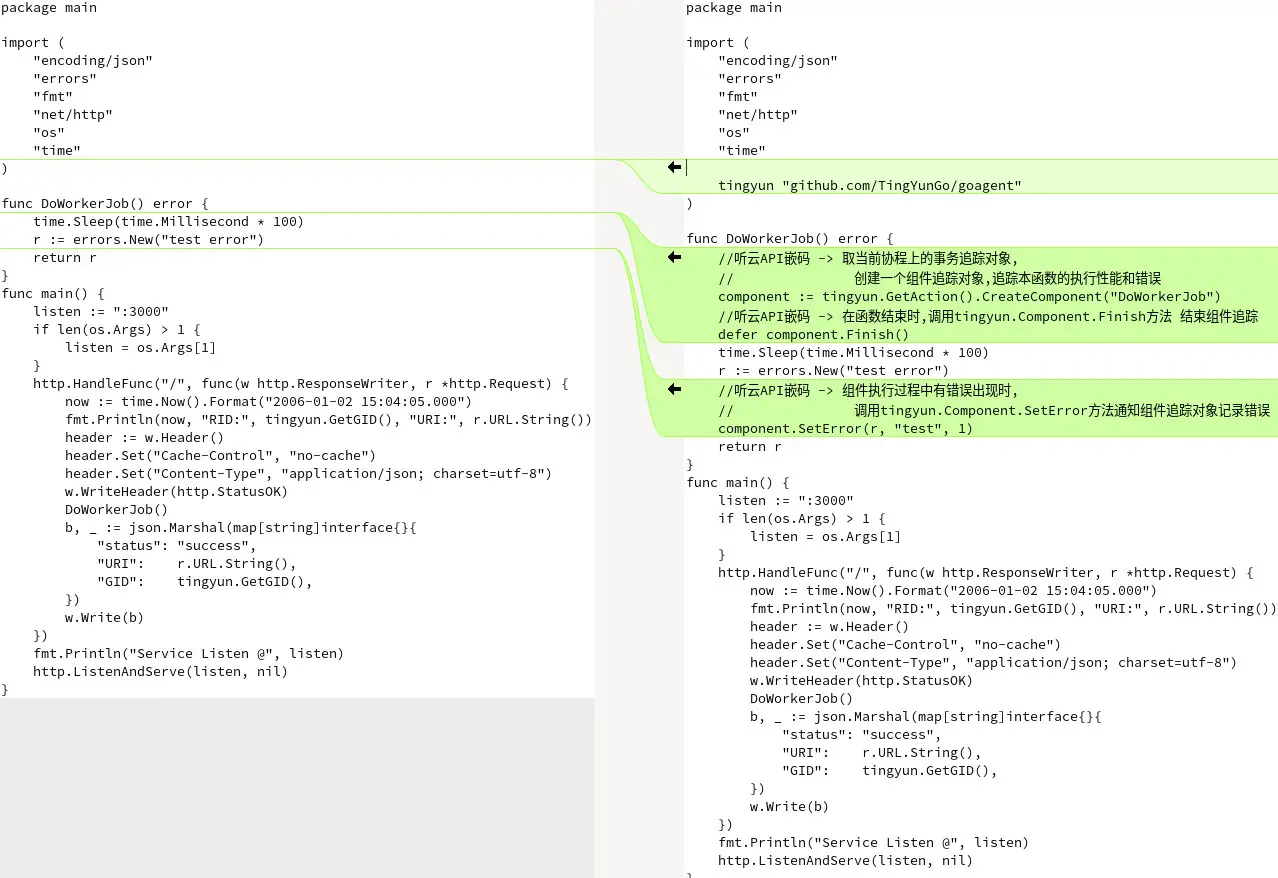
In the following web service example code, the service processing framework is automatically instrumented, but some components are not supported by the framework, so the creation of component objects is done manually. For the actual application code, see here.
Comparison before and after code instrumentation:
Compiling:
$ go mod tidy
$ go build
Running:
-
Step 1: Configure the tingyun.conf file, set license_key to your actual license key, and set collector.address to your actual Agent Collector address.
-
Step 2: Set environment variables and run.
$ export TINGYUN_GO_APP_CONFIG=tingyun.conf
$ ./api_webapp
Testing Access:
Access via browser: http://127.0.0.1:3000/test
Or use the curl command:
$ curl http://127.0.0.1:3000/test
Viewing Application Performance Data:
If the instrumentation and configuration are correct, after the application starts, log in to the Tingyun APM Console, and you will see the data for the api_webapp application in the application list.