接入Prometheus数据
确认Collector安装的服务器
Collector需要读取Prometheus Exporter接口的数据,需要保证Collector和Prometheus Exporter服务器网络可以连通。
Collector最低版本要求:4.2.0.0, 并且启用Guanyun Collector模块
开通防火墙策略
⚠️ 下面是演示的IP地址和端口,请根据实际项目内的地址和端口信息开通网络策略。
| 源地址 | 目标地址 | 目标端口 | 说明 |
|---|---|---|---|
| Collector所在服务器 | 观云平台 | 80 | Collector安装,上传数据 |
| Collector所在服务器 | Prometheus Exporter | 9090 | 读取Prometheus Exporter数据 |
安装Collector
-
登录平台,在左侧导航栏中依次选择“全部应用 > 部署状态 > Collectors管理”。
-
在 Collectors管理 页签的右上角单击“新增”,并配置Collector参数。
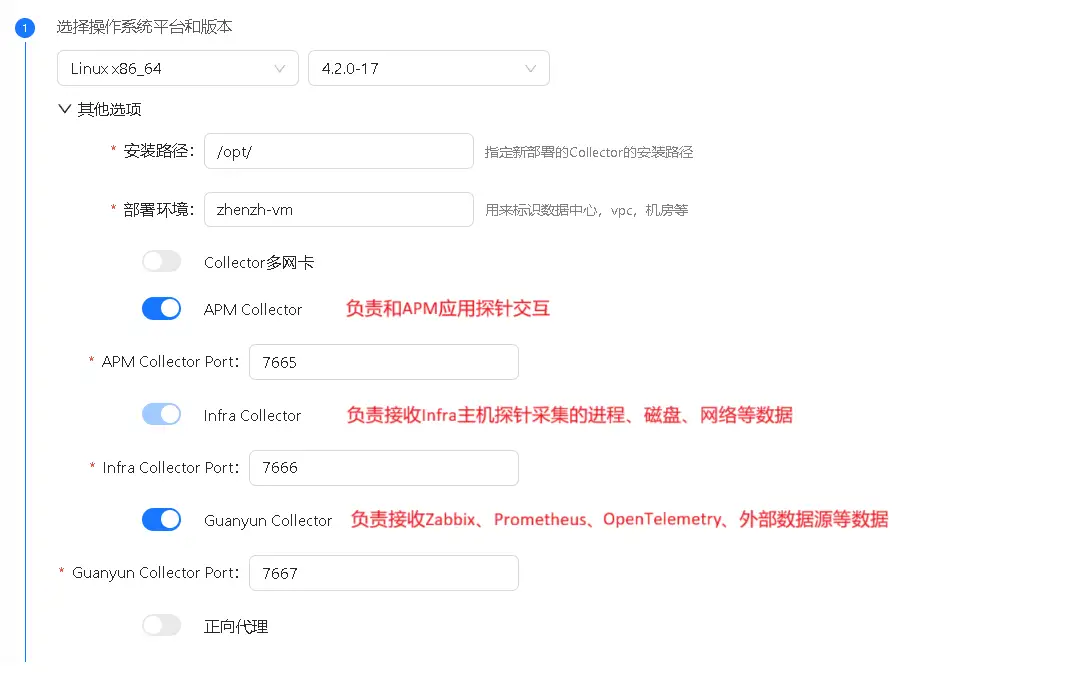
必须开启“Guanyun Collector”: 用来接收Zabbix、Prometheus、OpenTelemetry、外部数据源等产生的监控数据。
复制安装Collector的脚本,在服务器上安装Collector。
配置 Collector 接收 Prometheus 数据
进入 Collector 安装目录
cd /opt/tingyun-collector/
开启 Promethues 模块,当前仅支持主机指标的抽取
cd conf.d/prometheus
cp host-receiver.yaml.example host-receiver.yaml
cp host-processor-exporter.yaml.example host-processor-exporter.yaml
修改接收 Prometheus 数据配置。注意修改 targets 和 metrics_path 路径
vim host-receiver.yaml
receivers:
  prometheus/host:
    report_extra_scrape_metrics: false
    config:
      scrape_configs:
        - job_name: 'guanyun-default-prometheus'
          scrape_interval: 60s

          # password和password_file互斥,password只能明文,password_file中也只能明文可以设置chmod 600给当前用户
          #basic_auth:
          #  username: ""
          #  password: ""
          #  password_file:

          # 必填
          # Prometheus抓取uri地址
          # 默认 /federate
          metrics_path: /federate
          params:
            'match[]':
              - '{__name__=~"node_cpu.*"}'
              - '{__name__=~"node_uname.*"}'
              - '{__name__="node_memory_MemFree_bytes"}'
              - '{__name__="node_memory_Shmem_bytes"}'
              - '{__name__="node_memory_Buffers_bytes"}'
              - '{__name__="node_memory_Cached_bytes"}'
              - '{__name__="node_memory_MemTotal_bytes"}'
              - '{__name__="node_memory_SwapTotal_bytes"}'
              - '{__name__="node_memory_SwapFree_bytes"}'
              - '{__name__=~"node_vmstat.*"}'
              - '{__name__=~"node_disk.*"}'
              - '{__name__=~"node_filesystem.*"}'
              - '{__name__=~"node_network.*"}'
              - '{__name__="node_netstat_Tcp_CurrEstab"}'
              - '{__name__="node_sockstat_TCP_tw"}'
              - '{__name__=~"node_load.*"}'
          static_configs:

            # 必填
            # Prometheus抓取ip和端口
            # 示例: ['192.168.1.1:9090']
            - targets: ['']
          metric_relabel_configs:
            - source_labels: [exported_instance]
              target_label: exported_instance
              regex: '(.+):.*'
              replacement: '$${1}'
Prometheus 默认的抓取路径是/federate,如果配置了 --web-external-url=prometheus,则 metrics_path 配置成 metrics_path: /prometheus/federate。
重启Collector
修改完配置需重启 Collector
sudo systemctl restart tingyun-collector
验证数据
tail -f /opt/tingyun-collector/logs/guanyun/collector.log
查看报表
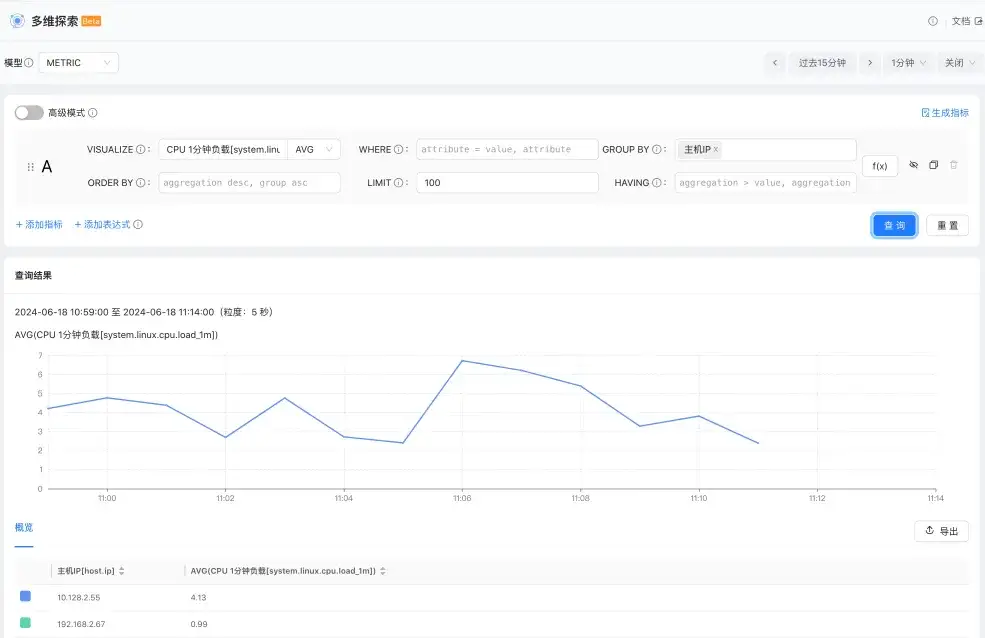
进入多维探索轻应用,数据模型选择 Metric,任意查询一个主机指标,按主机 IP 分组,确认接入的 Prometheus 数据的主机 IP 在列表中。