常见问题
查看Collector日志
进入容器
kubectl exec -it tingyun-collector-0 -n tingyun -- bash
在容器内部执行
# APM Collector日志
cd /opt/tingyun-collector/logs/apm
# Infra Collector日志
cd /opt/tingyun-collector/logs/infra
# Guanyun Collector日志
cd /opt/tingyun-collector/logs/guanyun
安装探针都需要什么权限?
安装探针需要 MutatingWebhookConfiguration、ClusterRoleBinding 和 ClusterRole 权限。
-
嵌入APM探针的原理是通过在集群内安装一个Webhook服务,此Webhook服务拦截Pod启动命令并对指定Pod追加initContainer来嵌入APM探针,安装Webhook服务需要MutatingWebhookConfiguration的权限。
为了实现限制同一Deployment内Pod嵌码的数量的功能,Webhook服务启动时需要通过Kubernetes API获取集群内已嵌码的Pod信息,获取Pod资源的只读权限,并对探针所属的账号赋权。
定义资源的读取权限需要ClusterRole的权限,对探针所属的账号赋权需要ClusterRoleBinding的权限。
-
Infra探针集成了监控Kubernetes集群信息的组件,原理是通过Kubernetes API获取集群内的相关信息,而调用Kubernetes API需要特定资源的读取权限,并对探针所属的账号赋权。
定义资源的读取权限需要ClusterRole的权限,对探针所属的账号赋权需要ClusterRoleBinding的权限。
为了最小化探针的权限,Infra探针使用ClusterRole权限时仅申请了Pod、Namespace 等实体资源的list watch get只读操作的权限,为了保证可以从探针所在的Pod内部访问kubernetes API server,需要申请tokenreviews和subjectaccessreviews资源的create权限。
缺少相应权限时,会报以下错误:
 Error from server (Forbidden): error when retrieving current configuration of:
 Resource: "admissionregistration.k8s.io/v1beta1, Resource=mutatingwebhookconfigurations", GroupVersionKind: "admissionregistration.k8s.io/v1beta1, Kind=MutatingWebhookConfiguration"
 Name: "tingyun-agent-webhook", Namespace: ""
 from server for: "./agent.yaml": mutatingwebhookconfigurations.admissionregistration.k8s.io "tingyun-agent-webhook" is forbidden:
 User "limited" cannot get resource "mutatingwebhookconfigurations" in API group "admissionregistration.k8s.io" at the cluster scope

 Error from server (Forbidden): error when retrieving current configuration of:
 Resource: "rbac.authorization.k8s.io/v1, Resource=clusterroles", GroupVersionKind: "rbac.authorization.k8s.io/v1, Kind=ClusterRole"
 Name: "tingyun-k8s-monitor", Namespace: ""
 from server for: "./agent.yaml": clusterroles.rbac.authorization.k8s.io "tingyun-k8s-monitor" is forbidden:
 User "limited" cannot get resource "clusterroles" in API group "rbac.authorization.k8s.io" at the cluster scope

 Error from server (Forbidden): error when retrieving current configuration of:
 Resource: "rbac.authorization.k8s.io/v1, Resource=clusterrolebindings", GroupVersionKind: "rbac.authorization.k8s.io/v1, Kind=ClusterRoleBinding"
 Name: "tingyun-k8s-monitor", Namespace: ""
 from server for: "./agent.yaml": clusterrolebindings.rbac.authorization.k8s.io "tingyun-k8s-monitor" is forbidden:
 User "limited" cannot get resource "clusterrolebindings" in API group "rbac.authorization.k8s.io" at the cluster scope
当出现以上错误时,请搜索安装的yaml文件内的管理员权限关键字,并将相关yaml内容交给集群管理员审核执行。
排查APM探针嵌码故障
业务Pod启动失败
查看Pod描述信息是否异常
kubectl describe pod [应用pod名] -n [应用所在的namespace]
查看事件信息是否异常
kubectl get event -n [应用所在的namespace]
查看Pod InitContainer日志
kubectl logs [应用pod名] -c tingyun-oneagent -n [应用所在的namespace]
常见原因:
-
InitContainer报错
exec /bin/sh exec format error,说明镜像和当前Node CPU架构不一致,请检查镜像的CPU架构,如果集群内既有ARM64又有AMD64的Node节点,请开启镜像manifest功能,并上传自适应架构的镜像。
-
Node节点的CPU或内存不足导致启动失败,使用命令
kubectl top node查看Node资源情况。 -
加上探针后,进程CPU内存占用会比原来略有增高,可能导致超过yaml描述文件内CPU和内存的limit限制,查看yaml内limit值。
-
加上探针后,启动时间会变长,可能触发Pod健康检查失败,查看健康检查策略。
业务Pod启动成功,嵌码成功,但业务应用访问故障
常见原因:
-
探针启动慢,查看业务应用日志和探针日志。
-
探针兼容性有问题,查看业务应用日志和探针日志。
业务Pod启动成功,嵌码失败
APM 探针嵌码分为2个大的阶段:
-
将探针镜像文件挂载到应用Pod文件系统。
-
应用Pod启动后,应用进程根据语言类型加载探针。
使用以下命令检查应用Pod是否挂载探针镜像文件:
kubectl describe pod [应用pod名] -n [应用所在的namespace] | grep tingyun-oneagent
例如:以下输出为已挂载状态
LD_PRELOAD: /opt/tingyun-oneagent/lib/libinterceptor.so
/opt/tingyun-oneagent from oneagent-volume (rw)
如果未挂载探针镜像文件,请按照步骤1-6排查, 如果已挂载探针镜像文件,请按照步骤7-12排查。
步骤1. 检查基调听云的Pod运行状态。
查看探针Pod状态:
kubectl get pod -n tingyun
输出内容应该类似如下:
NAME                               READY   STATUS    RESTARTS   AGE
cluster-metrics-76db8d69fd-pnv86   1/1     Running   0          23h
kubelet-metrics-ls847              1/1     Running   0          23h
tingyun-collector-0                1/1     Running   0          23h
tingyun-linux-agent-xk8pp          1/1     Running   0          22h
tingyun-webhook-6b96bc4f68-cggd6   1/1     Running   0          23h
tingyun-webhook-xxx 的状态应该为Running状态。
如果状态不等于Running,请使用 kubectl describe pod tingyun-webhook-xxx -n tingyun 查看pod的描述信息。
通常错误原因包括:镜像源网络不通、镜像CPU架构不匹配(ARM64或AMD64 )、集群内CPU或内存资源不足 等。
如果没有任何Pod信息,请使用kubectl查看deployment和replicaset的信息中是否有报错信息:
kubectl -n tingyun get all
kubectl -n tingyun describe deployment/tingyun-webhook
kubectl -n tingyun describe replicaset-controller/tingyun-webhook-xxx
例如在时速云平台,会有以下报错:
Warning  FailedCreate  2m18s (x15 over 7m46s)  replicaset-controller  Error creating:
pods "tingyun-webhook-675f7797db-" is forbidden: PodSecurityPolicy: unable to admit pod: []
如果出现PodSecurityPolicy错误,需要修改yaml中ClusterRole部分,添加PSP策略
apiVersion: rbac.authorization.k8s.io/v1
kind: ClusterRole
metadata:
  name: tingyun-k8s-monitor
rules:
# 如果开启了PSP使用权限,需放开下面注释, 查看已有的PSP策略: kubectl get psp
#- apiGroups:
#  - policy
#  resourceNames:
#  - system   # 绑定可用的PSP策略,如果开启Infra,需要绑定privileged权限
#  resources:
#  - podsecuritypolicies
#  verbs:
#  - use
查看探针服务状态:
kubectl get svc -n tingyun
输出内容应该类似如下:
NAME                        TYPE        CLUSTER-IP      EXTERNAL-IP   PORT(S)             AGE
cluster-metrics-service     ClusterIP   10.98.193.238   <none>        80/TCP              23h
tingyun-collector-service   ClusterIP   10.107.120.36   <none>        7665/TCP,7666/TCP   23h
tingyun-webhook-service     ClusterIP   10.99.222.1     <none>        443/TCP             23h
列表内应该包含tingyun-webhook-service服务和tingyun-collector-service和cluster-metrics-service服务
步骤2. 检查需嵌码应用所在Namespace的Label。
kubectl get namespace -L tingyun-injection
输出内容应该类似如下:
NAME              STATUS   AGE   TINGYUN-INJECTION
default           Active   20d
test              Active   9d    enabled
tingyun           Active   8d
嵌码应用所在Namespace的tingyun-injection标签应该为enabled。
步骤3. 检查需嵌码应用所在Pod的Label。
kubectl describe pod www.tomcat.com-689b69775f-s7tcl -n test
输出内容应该类似如下:
Name:           www.tomcat.com-689b69775f-s7tcl
Namespace:      test
Labels:         tingyun-agent-injected=enabled
Annotations:    tingyun-agent-id: 5022f18b-1944-11ed-b5a0-02427e459e42
嵌码应用所在Pod的tingyun-agent-injected标签应该为enabled
步骤4. 检查Webhook是否存在,或者是否是旧版本的Webhook。
kubectl get MutatingWebhookConfiguration | grep tingyun-agent-webhook
输出内容应该类似如下:
tingyun-agent-webhook 2022-05-08T04:50:33Z
如果没有内容输出说明Webhook安装失败。
如果有内容输出,检查Webhook创建日期,当删除旧版探针重新安装时,可能由于权限原因或遗漏卸载步骤导致Webhook没有更新。
步骤5. 查看webhook运行日志。
kubectl logs tingyun-webhook-xxx -n tingyun
tingyun-webhook-xxx 的logs应该包含对应Pod的更改记录。
以下为一个Pod启动时正常嵌码的日志:
AdmissionResponse: patch=[{"op":"add","path":"/spec/containers/0/volumeMounts/-","value":{"name":"oneagent-volume","mountPath":"/opt/tingyun-oneagent"}},{"op":"add","path":"/spec/containers/0/env","value":[{"name":"LD_PRELOAD","value":"/opt/tingyun-oneagent/lib/libinterceptor.so"},{"name":"TINGYUN_AGENT_ROOT","value":"/opt/tingyun-oneagent"},{"name":"TINGYUN_K8S_MODE","value":"true"},{"name":"TINGYUN_APP_NAME","value":"www.tomcat.com(test)"},{"name":"TINGYUN_NODE_NAME","valueFrom":{"fieldRef":{"fieldPath":"spec.nodeName"}}},{"name":"TINGYUN_INSTANCE_NAME","valueFrom":{"fieldRef":{"fieldPath":"metadata.name"}}},{"name":"TINGYUN_POD_NAMESPACE","valueFrom":{"fieldRef":{"fieldPath":"metadata.namespace"}}},{"name":"TINGYUN_POD_IP","valueFrom":{"fieldRef":{"fieldPath":"status.podIP"}}}]},{"op":"add","path":"/spec/initContainers","value":[{"name":"tingyun-oneagent","image":"goinline.cn/tingyunagent/oneagent:2.2.0.0","command":["sh"],"args":["-c","tar -xzf oneagent.tar.gz -C /oneagent \u0026\u0026 /oneagent/bin/init"],"env":[{"name":"TINGYUN_LICENSE_KEY","value":"9OgQXob4VGGFFYcm"},{"name":"TINGYUN_COLLECTORS","value":"tingyun-collector.tingyun.svc:7665"},{"name":"TINGYUN_DEFAULT_BUSINESS_SYSTEM","value":"k8scen"},{"name":"TINGYUN_WEBHOOK_SVC","value":"tingyun-agent.tingyun.svc:443"},{"name":"TINGYUN_APP_NAME","value":"www.tomcat.com(test)"},{"name":"TINGYUN_INSTANCE_NAME","valueFrom":{"fieldRef":{"apiVersion":"v1","fieldPath":"metadata.name"}}}],"resources":{"limits":{"cpu":"1","memory":"500Mi"},"requests":{"cpu":"1","memory":"200Mi"}},"volumeMounts":[{"name":"oneagent-volume","mountPath":"/oneagent"}],"terminationMessagePath":"/dev/termination-log","terminationMessagePolicy":"File","imagePullPolicy":"IfNotPresent"}]},{"op":"add","path":"/spec/volumes/-","value":{"name":"oneagent-volume","emptyDir":{}}},{"op":"add","path":"/metadata/annotations","value":{"tingyun-injected-status":"injected"}}]
如果logs内包含大量TLS handshake error from xxx: remote error: tls: bad certificate日志
可能原因:
-
由于权限原因导致更新探针时Webhook没有更新成功
-
手工替换过yaml文件的namespace名称,导致无法匹配webhook对应的域名
-
手工替换过yaml文件的SSL证书,导致证书无法验证通过
解决方案:请重新使用听云报表生成新的yaml,保证报表录入的namespace和实际部署的namespace一致,没有手工修改过证书信息,然后使用集群管理员权限重新安装听云探针。
如果logs除了启动的配置信息以外没有任何其他记录
说明集群的MutatingAdmissionWebhook插件没有启用或Webhook安装失败或配置错误。
-
检查MutatingAdmissionWebhook插件是否开启。
集群必须开启MutatingAdmissionWebhook插件,OpenShift 3.x版本上MutatingAdmissionWebhook插件默认是禁用状态,请联系集群管理员确认MutatingAdmissionWebhook插件状态。
例如:OpenShift 3.11 平台上API-Server日志,显示插件为禁用状态。
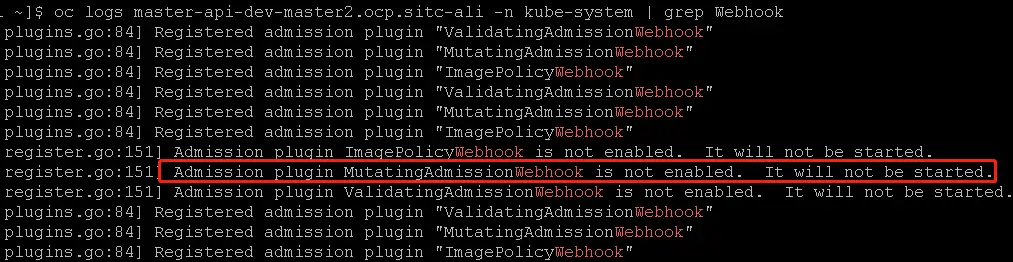
例如:MiniKube 平台上API-Server日志,显示插件为启用状态。

-
检查Webhook服务是否正常
找一个包含了wget或curl的业务Pod,验证Webhook 服务工作是否正常:
kubectl exec -it [应用pod名] -n [应用所在的namespace] -- \
wget --no-check-certificate https://tingyun-webhook-service.tingyun.svc/healthz
或
kubectl exec -it [应用pod名] -n [应用所在的namespace] -- \
curl -k -v https://tingyun-webhook-service.tingyun.svc/healthz
预期应该出现
Connected to tingyun-webhook-service.tingyun.svc (10.98.85.228) port 443和200 OK的信息,如果不是200状态,请根据curl或wget返回的错误信息确定问题。通常访问失败的原因包括:DNS解析失败、无法建立连接等。请联系集群管理员解决DNS和网络问题。
步骤6. 查看Kubernetes集群API-Server的日志。
如果DNS没有问题,仍没有logs记录,需要从Kubernetes集群API-Server的日志中查找关键字tingyun相关的线索。
kubectl logs kube-apiserver-minikube -n kube-system | grep tingyun-webhook
例如:可能返回以下错误内容
W1109 16:56:46.147598       1 dispatcher.go:67] Failed calling webhook: failing open tingyun-webhook-service.tingyun.svc:
failed calling admission webhook "tingyun-webhook-service.tingyun.svc":
Post https://tingyun-webhook-service.tingyun.svc:443/mutate?timeout=30s: dial tcp 10.84.93.142:443: connect: connection refused
如果kube-system中没有名称为kube-apiserver-xxx的pod,说明Kubenetes集群被定制开发过,需要联系集群管理员确认kube-apiserver的应用及日志路径。
如果kube-system中存在kube-apiserver-xxx pod,但无法获取API-Server的日志,可以ssh到kube-apiserver-xxx所在的Node节点,查看以文件形式存在的logs
例如:
sudo ls -l /var/log/pods/
sudo ls -l /var/log/pods/kube-system_kube-apiserver-box_3083cabb3f2a9f1b8072e250c84965cd/kube-apiserver/
sudo cat /var/log/pods/kube-system_kube-apiserver-box_3083cabb3f2a9f1b8072e250c84965cd/kube-apiserver/12.log
步骤7. 查看嵌码应用Pod的描述信息中是否包含tingyun-oneagent。
嵌码应用所在Pod应该包含名为 tingyun-oneagent的Init Container, 应该挂载路径为/opt/tingyun-oneagent的文件系统。
以下为正常嵌码状态的Pod描述信息:
$ kubectl describe pod www.tomcat.com-689b69775f-s7tcl  -n test
Name:           www.tomcat.com-689b69775f-s7tcl
Namespace:      test
Labels:         app=tomcat
                pod-template-hash=689b69775f
                tingyun-agent-injected=true
Annotations:    tingyun-injected-status: injected
Status:         Pending
Controlled By:  ReplicaSet/www.tomcat.com-689b69775f
Init Containers:
  tingyun-oneagent:
    Image:      tingyunagent/oneagent:2.2.0.0
    Command:
      sh
    Args:
      -c
      tar -xzf oneagent.tar.gz -C /oneagent && /oneagent/bin/init
    Environment:
      TINGYUN_LICENSE_KEY:              9OgQXob4VGGFFYcm
      TINGYUN_COLLECTORS:               tingyun-collector.tingyun.svc:7665
      TINGYUN_DEFAULT_BUSINESS_SYSTEM:  k8scen
      TINGYUN_APP_NAME:                 www.tomcat.com(test)
      TINGYUN_INSTANCE_NAME:            www.tomcat.com-689b69775f-s7tcl (v1:metadata.name)
    Mounts:
      /oneagent from oneagent-volume (rw)
      /var/run/secrets/kubernetes.io/serviceaccount from default-token-d2gn4 (ro)
Containers:
  tomcat:
    Image:      tomcat
    Port:       80/TCP
    Host Port:  0/TCP
    Environment:
      LD_PRELOAD:             /opt/tingyun-oneagent/lib/libinterceptor.so
      TINGYUN_AGENT_ROOT:     /opt/tingyun-oneagent
      TINGYUN_K8S_MODE:       true
      TINGYUN_APP_NAME:       www.tomcat.com(test)
      TINGYUN_NODE_NAME:       (v1:spec.nodeName)
      TINGYUN_INSTANCE_NAME:  www.tomcat.com-689b69775f-s7tcl (v1:metadata.name)
      TINGYUN_POD_NAMESPACE:  test (v1:metadata.namespace)
      TINGYUN_POD_IP:          (v1:status.podIP)
    Mounts:
      /opt/tingyun-oneagent from oneagent-volume (rw)
      /var/run/secrets/kubernetes.io/serviceaccount from default-token-d2gn4 (ro)
Conditions:
  Type           Status
  PodScheduled   False
Volumes:
  default-token-d2gn4:
    Type:        Secret (a volume populated by a Secret)
    SecretName:  default-token-d2gn4
    Optional:    false
  oneagent-volume:
    Type:        EmptyDir (a temporary directory that shares a pod's lifetime)
    Medium:
    SizeLimit:   <unset>
步骤8. 进入到应用容器内部检查/opt/tingyun-oneagent是否挂载成功。
$ kubectl exec -it www.tomcat.com-689b69775f-s7tcl -n test -- bash
Defaulted container "tomcat" out of: tomcat, tingyun-oneagent (init)

# ls /opt/tingyun-oneagent/
agent  bin  conf  data	lib  logs  run
嵌码应用所在的容器内部应该存在/opt/tingyun-oneagent。
步骤9. 进入到应用容器内部检查/opt/tingyun-oneagent/logs/oneagent/preload.log。
cat /opt/tingyun-oneagent/logs/oneagent/preload.log
如果preload.log日志开启了debug级别,正常情况下应该出现(pid:xxx) DEBUG process start的日志。
如果没有对应进程的process start记录,说明LD_PRELOAD环境变量被启动脚本或父进程清空或覆盖。
解决方案:仅2.5.6.2版本以上且容器环境为glibc才支持: 对deployment再单独打一个标签:tingyun-ldso-preload: "true"
Java应用的preload日志应该包含 JNI_CreateJavaVM,例如:
2022-05-16 06:05:22.500 98b6065442(pid:9,uid:0) DEBUG App Matched: dirname /usr/local/tomcat/bin/catalina.sh

2022-05-16 06:05:22.505 98b6065442(pid:1,uid:0) DEBUG App Matched: /usr/local/openjdk-11/bin/java -Djava.util.logging.config.file=/usr/local/tomcat/conf/logging.properties -Djava.util.logging.manager=org.apache.juli.ClassLoaderLogManager -Djdk.tls.ephemeralDHKeySize=2048 -Djava.protocol.handler.pkgs=org.apache.catalina.webresources -Dorg.apache.catalina.security.SecurityListener.UMASK=0027 -Dignore.endorsed.dirs= -classpath /usr/local/tomcat/bin/bootstrap.jar:/usr/local/tomcat/bin/tomcat-juli.jar -Dcatalina.base=/usr/local/tomcat -Dcatalina.home=/usr/local/tomcat -Djava.io.tmpdir=/usr/local/tomcat/temp org.apache.catalina.startup.Bootstrap start

2022-05-16 06:05:22.517 98b6065442(pid:1,uid:0) INFO on JNI_CreateJavaVM

2022-05-16 06:05:22.517 98b6065442(pid:1,uid:0) DEBUG Option[0]: --add-opens=java.base/java.lang=ALL-UNNAMED

2022-05-16 06:05:22.517 98b6065442(pid:1,uid:0) DEBUG Option[1]: --add-opens=java.base/java.io=ALL-UNNAMED

2022-05-16 06:05:22.517 98b6065442(pid:1,uid:0) DEBUG Option[2]: --add-opens=java.base/java.util=ALL-UNNAMED

2022-05-16 06:05:22.517 98b6065442(pid:1,uid:0) DEBUG Option[3]: --add-opens=java.base/java.util.concurrent=ALL-UNNAMED

2022-05-16 06:05:22.517 98b6065442(pid:1,uid:0) DEBUG Option[4]: --add-opens=java.rmi/sun.rmi.transport=ALL-UNNAMED

2022-05-16 06:05:22.517 98b6065442(pid:1,uid:0) DEBUG Option[5]: -Djava.util.logging.config.file=/usr/local/tomcat/conf/logging.properties

2022-05-16 06:05:22.517 98b6065442(pid:1,uid:0) DEBUG Option[6]: -Djava.util.logging.manager=org.apache.juli.ClassLoaderLogManager

2022-05-16 06:05:22.517 98b6065442(pid:1,uid:0) DEBUG Option[7]: -Djdk.tls.ephemeralDHKeySize=2048

2022-05-16 06:05:22.517 98b6065442(pid:1,uid:0) DEBUG Option[8]: -Djava.protocol.handler.pkgs=org.apache.catalina.webresources

2022-05-16 06:05:22.517 98b6065442(pid:1,uid:0) DEBUG Option[9]: -Dorg.apache.catalina.security.SecurityListener.UMASK=0027

2022-05-16 06:05:22.517 98b6065442(pid:1,uid:0) DEBUG Option[10]: -Dignore.endorsed.dirs=

2022-05-16 06:05:22.517 98b6065442(pid:1,uid:0) DEBUG Option[11]: -Djava.class.path=/usr/local/tomcat/bin/bootstrap.jar:/usr/local/tomcat/bin/tomcat-juli.jar

2022-05-16 06:05:22.517 98b6065442(pid:1,uid:0) DEBUG Option[12]: -Dcatalina.base=/usr/local/tomcat

2022-05-16 06:05:22.517 98b6065442(pid:1,uid:0) DEBUG Option[13]: -Dcatalina.home=/usr/local/tomcat

2022-05-16 06:05:22.517 98b6065442(pid:1,uid:0) DEBUG Option[14]: -Djava.io.tmpdir=/usr/local/tomcat/temp

2022-05-16 06:05:22.517 98b6065442(pid:1,uid:0) DEBUG Option[15]: -Dsun.java.command=org.apache.catalina.startup.Bootstrap start

2022-05-16 06:05:22.517 98b6065442(pid:1,uid:0) DEBUG Option[16]: -Dsun.java.launcher=SUN_STANDARD

2022-05-16 06:05:22.517 98b6065442(pid:1,uid:0) DEBUG Option[17]: -Dsun.java.launcher.pid=1
步骤10. 进入到应用容器内部检查应用进程是否加载了libinterceptor.so。
应用进程名称依赖语言类型,通常:
-
Java应用的进程名为 java。
-
.NET Core应用的进程名为dotnet。
-
PHP应用的进程名为php-fpm。
# ps -ef | grep java
# cat /proc/[pid]/maps | grep tingyun
应用进程的maps文件内应该包含/opt/tingyun-oneagent/lib/libinterceptor.so。
如果应用进程的maps文件内没有/opt/tingyun-oneagent/lib/libinterceptor.so 说明LD_PRELOAD环境变量被启动脚本或父进程清空或覆盖。
解决方案:仅2.5.6.2版本以上且容器环境为glibc才支持: 对deployment再单独打一个标签:tingyun-ldso-preload: "true"
如果是Java应用,进程的maps文件内应该包含tingyun-agent-java。
例如以下为正常状态:
ps -ef | grep java
root           1       0  1 06:05 ?        00:00:10 /usr/local/openjdk-11/bin/java -Djava.util.logging.config.file=/usr/local/tomcat/conf/logging.properties -Djava.util.logging.manager=org.apache.juli.ClassLoaderLogManager -Djdk.tls.ephemeralDHKeySize=2048 -Djava.protocol.handler.pkgs=org.apache.catalina.webresources -Dorg.apache.catalina.security.SecurityListener.UMASK=0027 -Dignore.endorsed.dirs= -classpath /usr/local/tomcat/bin/bootstrap.jar:/usr/local/tomcat/bin/tomcat-juli.jar -Dcatalina.base=/usr/local/tomcat -Dcatalina.home=/usr/local/tomcat -Djava.io.tmpdir=/usr/local/tomcat/temp org.apache.catalina.startup.Bootstrap start
root          99      85  0 06:17 pts/0    00:00:00 grep java

cat /proc/1/maps | grep tingyun
7fa10807a000-7fa10807b000 r--s 00000000 fd:00 71524153                   /usr/local/tomcat/temp/tingyun-agent-java-bootstrap13874205463106685302.jar
7fa10807b000-7fa10807c000 r--s 00001000 fd:00 71524152                   /usr/local/tomcat/temp/tingyun-agent-inspect-api14972125563454570786.jar
7fa10807c000-7fa10807f000 r--s 0000a000 fd:00 71524151                   /usr/local/tomcat/temp/tingyun-agent-api12248287110149823502.jar
7fa10807f000-7fa108085000 r--s 00029000 fd:00 71524150                   /usr/local/tomcat/temp/tingyun-agent-proxy15757291668964798396.jar
7fa10aba3000-7fa10aba5000 r--p 00000000 fd:00 104907973                  /opt/tingyun-oneagent/lib/libinterceptor.so
7fa10aba5000-7fa10abdb000 r-xp 00002000 fd:00 104907973                  /opt/tingyun-oneagent/lib/libinterceptor.so
步骤11. 进入到应用容器内部检查/opt/tingyun-oneagent/logs/agent/下是否有探针日志文件。
ls -l /opt/tingyun-oneagent/logs/agent/
total 328
-rw-r-----. 1 root root 320328 May 16 06:13 java-agent-98b6065442730569998e3f6c89af916bdab7cb36c8edafe85059a8e57ef4a2e7-1.log
-rw-r-----. 1 root root   5296 May 16 06:05 java-starter-98b6065442730569998e3f6c89af916bdab7cb36c8edafe85059a8e57ef4a2e7-1.log
嵌码应用所在的容器内部应该存在/opt/tingyun-oneagent/logs/agent日志文件。
步骤12. 查看探针日志,是否有和Collector通讯的错误。
vi /opt/tingyun-oneagent/logs/agent/java-agent-98b6065442730569998e3f6c89af916bdab7cb36c8edafe85059a8e57ef4a2e7-1.log
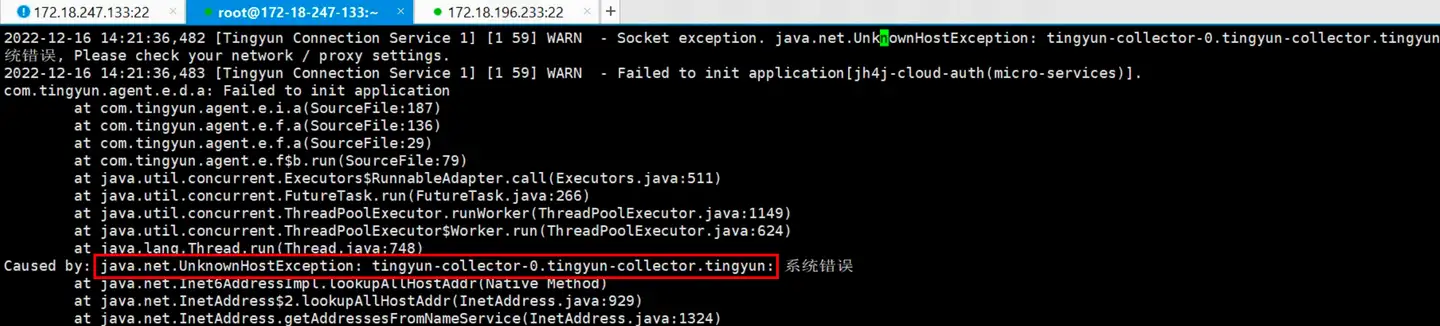
如果业务应用Pod使用了hostNetwork模式,可能导致业务应用Pod由于无法解析collector的集群内域名而通讯失败
命令kubectl describe pod里面不展示 镜像权限、安全权限、网络权限相关的信息,需要联系客户运维查看部署yaml里面的配置信息才能确定业务应用Pod是否使用了hostNetwork模式
此时需要在集群外部独立部署Collector,并修改tingyunagent.yaml内tingyun-injector-config的pod-init.sh,将此Pod内的探针配置文件内的Collector地址修改为独立部署Collector的IP。
错误如图:
下面将TINGYUN_APP_NAME名称为host-network-app(default)的应用使用的collector修改为192.168.5.1:7665:
# APM探针-探针配置文件
# configmap.yaml
# tingyun-agent 配置项

apiVersion: v1
kind: ConfigMap
metadata:
  name: tingyun-injector-config
  namespace: tingyun
data:
  pod-init.sh: |
    #!/bin/sh
    if [ "${TINGYUN_APP_NAME}" = "host-network-app(default)" ]; then
        sed -i -e "s/collectors=.*/collectors=192.168.5.1:7665/" ${ONEAGENT_CONF}
    fi
然后使用yaml文件更新。
kubectl apply -f tingyunagent.yaml